Friday, April 21, 2023

Soft Focus Pictorialist Effects ~ part Four

Continuing the Mad Quest to look more deeply at this Dastardly Difficult to Wrangle Under Control Pentax 85mm f/2.2 Soft, I'd like to now consider image processing and its influence on soft focus Pictorialist effects.

As I previously wrote, there was an underlying "sharpness" to the 85mm Soft that lay just below the under-corrected spherical aberration "glow."  I see this from wide open.

One thing we have today that we didn't back in the Old Film Days are a vast array of tools that can be used to modify various aspects of an image.  Certainly, there were processes we could use in those Old Dinosaur Days of Film, such as contrast controls and masking.

Contrast controls should be self-evident.

Masking in the Old Film Days could be used for at least two ends.  One was to control global contrast when using contrasty print media.  I'm thinking of Christopher Burkett's fabulous works printed to Cibachrome.  I've been fortunate to see his work in person.  He is clearly a Master Print Maker and his images absolutely "sing."  He masks everything he prints.

Another use for masking was to reveal the mid-tones of a scene.  We used to do this in a photo-print lab that I worked at.  It was a time consuming, exacting, difficult process.  It was rather expensive, too.  I'm not sure how many clients we actually had, if any, for the service.

A few Dinosaur Age Film Photographers created softened images that had a certain "spark" to them.  Considering the works of David Hamilton and his hairspray filters, it's interesting to note that he used Ektachrome 200 film that was pushed to 400ASA or 800ASA (and perhaps more?).  

This did two things.  First it increased the grain size, as would be expected.  I'm convinced the grain added a "artful" distance between the viewer and the subject.  I feel this is the case from looking at David Hamilton's last work.  It's too "clean" looking, even though the work had his signature soft rendering.

Second, the push development process increased contrast.  I'll bet dollars to doughnuts that normally processed 200ASA Ektachrome images would've been seen as too soft, in part due to the lower contrast. 

I'm imagining that David Hamilton stumbled upon a process that "worked" for him.  The way he lit, filtered (light hairspray on UV filter), composed and printed his images very likely depended on his choice of film and processing.  He might not have known "how" to get from here there, yet I'm continuing to imagine that he uncovered a useful process, perhaps by accident and/or by experimentation, liked the results, and made a career out of the whole thing.

That's one of the great things about photography.  There's so much room for experimentation and exploration.  If something doesn't "work", we can build on what we've learned and try something else.  Even if, back in the Good 'Ol Film Days expérimentation could be a lengthy, hit/miss process.

Sometime I might share a black and white film developing process that broke many of the "rules" of film development, yet was the foundation for a successful Lord and Taylor ad compagne that ran for years.  The photographer I learned the process from was rather successful and his works looked on some level more like "art" than photography.  How Robert Randall came upon the process I'll never know.  All I know is it "worked."

Coming to current time, digital image processing includes a number of functions that we would've given our eye teeth for back in the Old Film Days.  Luminosity masks being one example.  Clarity and Texture functions in Pay-dobe' parlance, or Local Contrast and Micro Contrast in RawTheraee terms being another example.  These and many many other tools are well integrated into digital image processing software.  One can view the impact/results of these functions instantaneously.  No need to wait a few days for results to come back from a laboratory.

In this spirit I experimented using RawTherapee hoping to find a way to unlock the veiled resolution hidden in the Pentax 85mm f/2.2 Soft lens.   This post is described what I found.

Setup ~ 

  • Camera - 
    • Sony A7, 100ISO, 2sec timer, "A" mode
  • Lens - 
    • Pentax 85mm f/2.2 Soft at f/2.2, f/2.8, and f/4
  • Bogen tripod
  • RawTherapee - 
    • Global contrast increased by image to taste
    • Local Contrast increased by image to taste


Image Processing Comparison ~

As always, click on the image and enlarge to 100percent to see whatever there is to be seen.


Pentax 85mm f/2.2 Soft at f/2.2

Pentax 85mm f/2.2 Soft at f/2.2
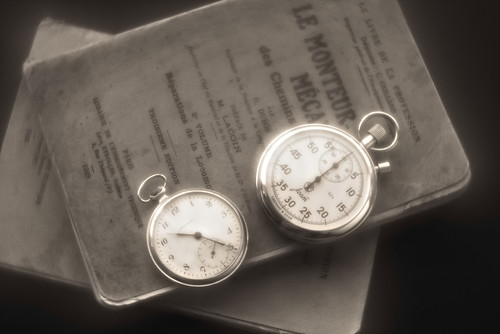
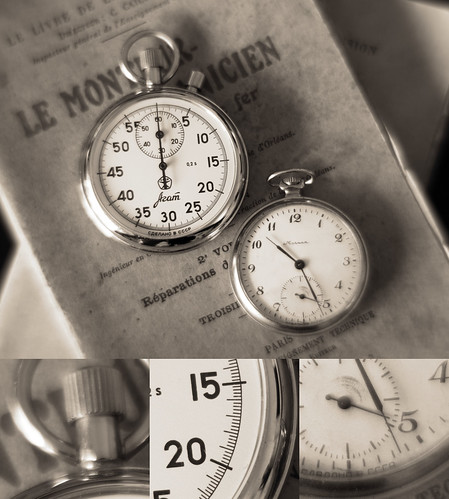
Base Image

This is the starting point for the image processing comparison. I see a strong veiling softness at f/2.2.  Just under that, the image looks sharp, particularly  around the numerals on the faces of the watches.  That is where I focused the lens, so this makes sense, right?


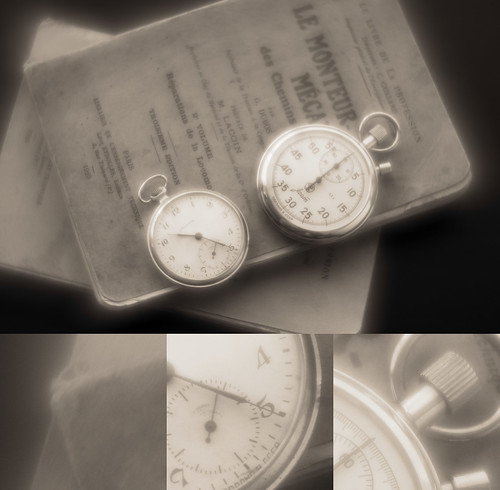
Processing Comparison ~ Pentax 85mm f/2.2 Soft at f/2.2 ~ Local/Global/Curves Contrast Comparison Base

Pentax 85mm f/2.2 Soft at f/2.2
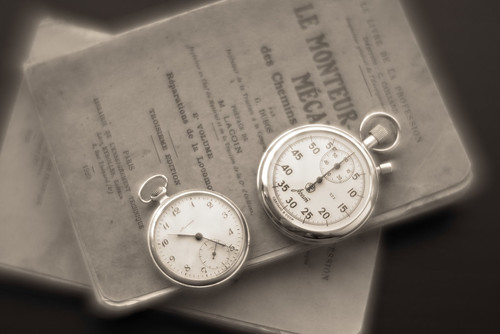
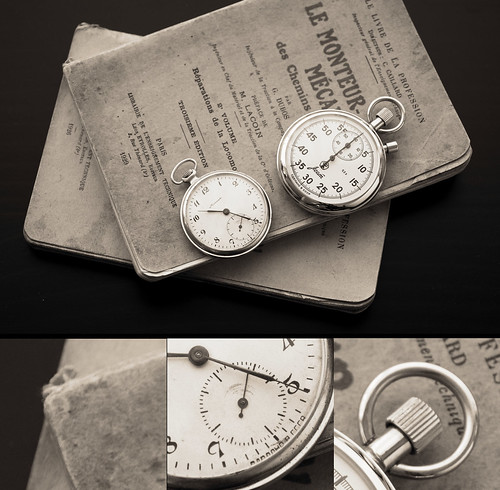
+ image processing

By choosing a strong global contrast setting, and a strong Local Contrast setting I was able to "bring up" the details of the watch faces.  The veiling "glow" remains quite strong.  
 
To my admittedly aging eyes this doesn't look 1/2 bad.  I feel this begins to prove a point about the power of software image processing tools.  With a little work it appears I can offset the soft effects of the Pentax 85mm lens.


Pentax 85mm f/2.2 Soft at f/2.8

Pentax 85mm f/2.2 Soft at f/2.8
Base Image

Processing Comparison ~ Pentax 85mm f/2.2 Soft at f/2.8 ~ Local/Global/Curves Contrast

Pentax 85mm f/2.2 Soft at f/2.8
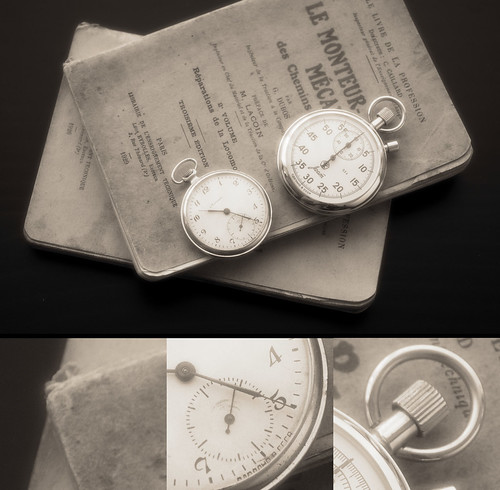
+ image processing

Stopping down one click changed dramatically the softness of the overall image.  For this reason I didn't need to push neither the global contrast nor Local Contrast controls as hard as I did in the f/2.2 version.
 
This is looking rather nice, actually.  The highlights glow, but not too much.  The mid-tones are revealed quite well.  Clearly the image was made using a soft focus lens.  There are the optical effects I expected to see, but they are now coming under control in relationship to the "glow" and the overall image.
 
I could stop here, but why?


Pentax 85mm f/2.2 Soft at f/4

Pentax 85mm f/2.2 Soft at f/4
Base Image

Procsssing Comparison ~ Pentax 85mm f/2.2 at f/4 ~ Local/Global/Curves Contrast

Pentax 85mm f/2.2 Soft at f/4
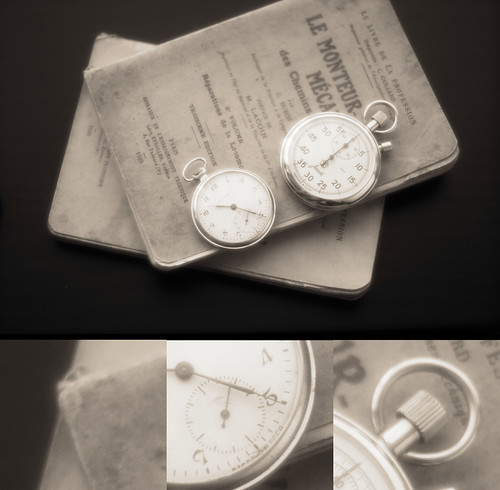
+ image processing

Stopping down two clicks changes even further the softness of the overall image.  I didn't need to push either the global contrast nor Local Contrast controls as hard as I did in the f/2.8 version.
 
I see the "resolution hole" beginning to open in the center of the frame.  The image is sharper in the center of the frame than it is around the edges.  The sense of "glow" and optical effects are still in effect.  And I see that I didn't make the darks as deep in the re-processed sample than I did in the original.  Hopefully the mid-tone differences are apparent.

Where is the balance with this subject and this lens using strong side-lighting?  It comes down to how sharp I want the center of the image and how much edge softness I could tolerate.  I think there might be a very nice balance at f/3.5.

Considering Local Contrast in RawTherapee, I believe there might be another way of revealing the underlying sharpness.  That tool is Micro-Contrast.  I'll have a look at it in a future post.

Sunday, April 16, 2023

Soft Focus Pictorialist Effects ~ part Three

It's been such a long process of thinking, considering and trying to use soft focus lenses that I've developed a sense that my story includes looking into the morning mirror to see Don Quixote reflected back.  There's just enough self recognition in this Madness for me to question why I even bother, but bother I persist.  I know the windmills aren't what I've taken them to be, if only I could work out how.

In deepening my understanding of how to use meniscus soft focus lenses I am beginning to build a matrix of relevant information that I feel/hope/believe I can use to determine when a soft focus optic is "right" for me to use.

As a starting point, in the first two posts in this series I looked at how a Dastardly Difficult to Master 85mm lens behaves with close-up subjects.  In this post I would like to move the lens back a little from the subject and explore how the Pentax 85mm f/2.2 Soft renders at mid-distance

Before I get to the comparison images I'd like to share the nuggets of years of conversations with those who really know and to (*shock*, *horror* men don't usually do this king of thing) carefully read the lens' instruction manual.

While I knew this intuitively, I don't think I fully appreciated it until very recently.  A soft focus lens' aperture controls the level of softness the lens returns.

Duh.  Obviously.

Yet, if I look carefully at the effect of aperture on image softness, at some point the center of the image becomes clear to reveal an already existing at wider aperture underlying sharpness.  The transition areas from sharp to soft can be tricky.  In the case of this Pentax, the lens "resolution hole" that appears in closeup images around f/4 has a transition zone that swirls the edges of the scene.  

I don't find this pleasing.  It reminds me too much of the swirly out of focus rendition that Helios 40, Petzval, and many other early and now Hipster-Have-to-Have lenses deliver.  With one exception, I've never viewed a swirly background image that I could fully appreciate.  The swirly effect for me gets in the way.  Alex Timmerman's work being the exception.  OK.  Maybe two photographers.  Sally Mann makes incredible images from time to time in this style, too.

What this means to me is that while being strictly true that aperture controls the level of lens softness in meniscus photographic optics, the fuller answer is a bit more subtle.

As an aside, large format film soft focus lenses don't normally show much problem in the transition areas from sharp to veiling under-corrected aberration softness.  

Yes, if I look carefully at the edges of Chetworth delGato's work that I'm using as a reference, I can see a similar effect to what I've encountered with the smaller format Pentax, but the 9inch Pinkham & Smith Semi-Achromatic transition effect seems to be a bit more subtle.  I'll bet dollars to doughnuts that part of the reason is the way the transition zone is hidden by the way the subject is lit.  I'll keep this point in mind as I go along.

I am now of the thought that large format film lenses have been designed with a larger field of view than the small format Pentax, and that the gaping "resolution hole" that can form as a lens is stopped down is often _outside_ the field of view when using big sheets of film and longer soft focus lenses.  How do I feel this is true?  Look at instances where a lens' field of view is smaller than the film format.  I'll explore this, too, in the near future.

While mulling all of these things over in my wee-little brain, Bonzo Din suggested that the instruction manual for the Pentax 85mm f/2.2 Soft might provide important clues on how to use the lens.  Translating from Japanese, he found the lens was made for close-up and portrait work.  It is strongly hinted that landscape work with this Soft lens is best used in conjunction with a tele-converter.

There it is.  Truth.  Which underscores that fact that, if it's available (and in this case it often isn't), it pays to read the bl**dy manual.

The Pentax 85mm f/2.2 Soft is a close-up lens or a portrait optic.  Period.  It is not, repeat not, a general purpose lens in the sense that it might behave consistently across a wide range of subject to lens distances.  It doesn't.  Rendition consistency is lost on this lens.  It wasn't designed for that.  It's a two trick pony. If landscape photography is a goal, then a tele-extender is recommended.

In this post I will consider how the Pentax 85mm f/2.2 Soft behaves as a portrait lens.   I will use myself as the subject.  Viewer discretion is advised.

Setup ~ 

  • Composition -
    • Considering the "resolution hole" that opens in the middle of the frame starting around f/4, the subject's head (mine) was placed dead center in the field, right in the middle of the "resolution hole," so as to try and achieve the best possible sense of sharpness
    • If the head was placed nearer to the edge of the frame I know it would be distorted and covered with too much veiling under-corrected spherical aberration softness coming from what I'm calling the "resolution hole"
       
  • Camera - 
    • Sony A7, 100ISO, 2sec timer, "A" mode
    • Sony Remote Trigger so the subject could remain seated
  • Lens - 
    • Pentax 85mm f/2.2 Soft at f/4, f/4.8, f/5.6
  • Bogen tripod 
  • RawTherapee - 
    • Similar image processing settings applied to all images so as to observe optical differences
    • Vanity Alert - I used a red filter in BW conversion to suppress the skin imperfections and to raise the skin tones to something I found pleasing


Comparison ~

As always, click on the image and enlarge to 100percent to see whatever there is to be seen.

To facilitate the following comparisons, open Chetworth's image in a window, and then open my images in an adjacent window.


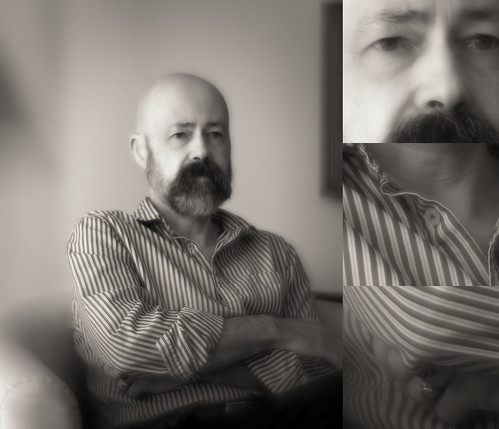
Autoportrait ~ Pentax 85mm f/2.2 Soft at f/4

Pentax 85mm f/2.2 at f/4

The underlying sharpness of the face and shirt collar regions are visible, but to my eyes, the overall image appearance is just slightly too soft, particularly when compared with the 9 inch Pinkham & Smith.


Autoportrait ~ Pentax 85mm Soft f/2.2 at f/4.8

Pentax 85mm f/2.2 at f/4.8

Of the three comparison images here, I feel this is the best balance between center sharpness and edge softness drop-off.  The face and collar regions are reasonably sharp.  The sleeve at the bottom of the image is not offensive to me.  The "resolution hole" isn't quite as obvious as in the following example.

Comparing this image to Chetworth's, it's not half bad at these viewing sizes to my admittedly aging eyes.  My image isn't as sharply lit as Chetworth's.  His model is far more interesting than mine.  And  I would expect the 5x7inch film image to be sharper in reality around the face and shoulders than in the above photo.  

But I have to say I'm pleased with the above result.


Autoportrait ~ Pentax 85mm Soft f/2.2 at f/5.6

Pentax 85mm f/2.2 at f/5.6

Compared with the prior two images, I feel the face and shirt collar areas in this f/5.6 image are the sharpest.  The transition "resolution hole" from sharp to soft is the most promenant, too.  If I'd lit this a little differently I might've had more success in hiding the effect.

What I've confirmed for myself is that aperture controls can be a little tricky on a lens like this.  It takes a delicate touch to extract the most out of the optic.  I can't just put the lens at a certain aperture by looking through the viewfinder and seeing something that looks good in-camera.  No.  It's more subtle than that.

Saturday, April 15, 2023

Soft Focus Pictorialist Effects ~ part Two

Chetworth Del Gato posted a soft focus image to Flickr.  I saw it, appreciated it for a moment, and was about to move on to look at something else when I stopped and had a good long look.  Gawds! I think it's gorgeous.  Call me Old Fashioned.  Call me a Sentimentalist.  Call me a Fool.  I don't care.  It's a great image.

The subjects eyes are sharp.  The entire image glows beautifully.  The edges are gently softer overall than the center, but not by much.  The lighting is nearly perfect.  The composition is classic.  To me it's a good example of what current day Pictorialist practitioners can achieve.

Chetworth used a 9inch Pinkham & Smith Semi-Achromatic to 5x7 film. That lens is filled with optical imperfections that modify the scene in "just the right way."  It's such an "artistic" optic.

I asked the photographer if he felt one could replicate the effect in smaller format cameras. He said he didn't think it was possible.

If you know me, you know I love a good challenge.  That's really what this series on Soft Focus Pictorialist Effects is all about.  I'm still trying after many years to see how close I can come to duplicating the "look" and "feel" of large format film photography what uses early soft focus lens.

In the first post on the topic I talked about how a "resolution hole" opened up when using the Pentax 85mm f/2.2 Soft as the lens was stopped down.  This is where the center of the image is sharp and without much of an overlaying softness, and where the edges retain an obvious amount of under-corrected spherical aberration.

The "resolution hole" appeared at f/4 and became very apparent at f/5.6.  It is so strong that it was somewhat disorienting to me in the f/5.6 comparison image.  This got me to thinking and wondering.

How sharp is this Pentax 85mm f/2.2 Soft at f/5.6?

The following may help answer that.

To begin with, it's important to note the image I use here was shot at the lens' minimum focus point.  The subject was about a foot or so away from the camera.

While the image talked about in this blog entry is not trying to duplicate the effects Chetworth achieved in his 5x7inch film photograph, it is a potentially important stepping-stone to a greater understanding of how I should use this dastardly Pentax 85mm f/2.2 Soft.


Setup ~ 

  • Camera - 
    • Sony A7, 100ISO, 2sec timer, "A" mode
  • Lens - 
    • Pentax 85mm f/2.2 Soft at f/5.6
  • Bogen tripod
  • RawTherapee - similar image processing settings applied to all images


How sharp is it?

As always, click on the image and enlarge to 100percent to see whatever there is to be seen.


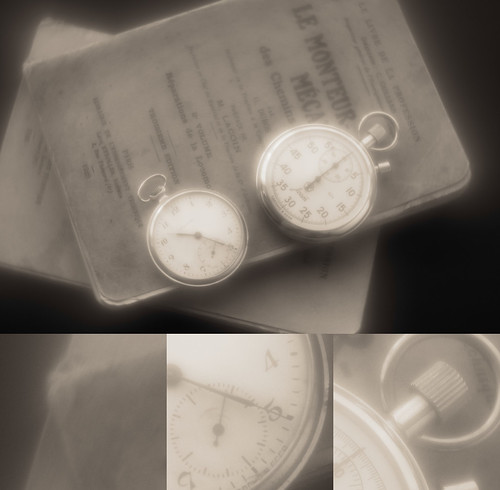
Close up study ~ Pentax f/2.2 Soft 85mm at f/5.6


Looking at the on-axis dial face of the stopwatch where I focused the lens, I'd say the lens is pretty darned sharp.  If I were after something sharp, I'd have no problem with the center of the frame.  Looking at the near-off-axis portions of the image I see the abrupt transition from sharp to an under-corrected spherical aberration overlay of softness.
 
By now it should be pretty obvious that in close-up work, the Pentax f/2.2 Soft is not, repeat not, a general purpose lens.  I type this thinking of comments I've read around the internet over the years where people talk about soft focus lenses and say things like such-and-such lens is soft from wide open, but it cleans up nicely by f/this-and-that.   This is not one of those lenses.

On the other hand, if I wanted to photograph flowers, I might not care, and in fact might appreciate the rapid increase in surrounding softness outside the "resolution hole."  On the proper subject, composition, and background, the lens might help create something rather interesting.  Right there is another hint at how to use this lens.

As I said in the previous entry, so far the images made in these comparisons use the Pentax Soft near its minimum focus point.
 
Without getting too far ahead of myself, I have the strange feeling that there might be a specific matrix of possibilities/applications where meniscus soft focus lenses operate at their best.  I'll explore this idea a bit further in the near future.

Friday, April 14, 2023

Soft Focus Pictorialist Effects ~ part One

I have a copy of Taschen's "Camera Work - The Complete Photographs."  It's a weighty, densely filled book given it's rather small size.  I often refer to it seeking inspiration and understanding of how Pictorialist/Secessionist photographers worked their art and craft.

There is a copy of "Clarence H. White and his world" on the bookshelf, too. This is bigger and heavier than "Camera Work." It's more of a show catalogue from a curated exhibition.  The book comes with long essays that explain White's background, history, life, and times.  It's fascinating, actually.  It recalls how early practitioners would gather to share ideas, processes, and how they would many times work in groups when making images.  It sounds as if it was a very sociable exercise.

One of the many tools Pictorialists might use were soft focus lenses.  Some of the works that still impress me the most are by Clarence White, Edward Steichen, Robert Demachy, Karl Struss, and George H. Seeley.  One image in particular stands out for me.  It was made by George Bernard Shaw of Alvin Langdon Coburn.

For years I've tried to find a process, a technique, an approach to creating soft focus-effect images in the Pictorialist style.  Forty years ago I started buying and trying various soft focus lenses such as Wollensak Verito, Portland Portrait, Rodenstock Imagon, Fuji large format SF, and medium format RB 150mm SF lenses

As I started downsizing image capture formats I entered a two decade long "phase" of collecting and shooting with old manual focus Nikon Nikkor lenses.  I was looking to take advantage of their more subtle under-corrected spherical aberration behind the point of focus.

Other than a series of images I made using a Mamiya RZ and the RB 150mm SF, the whole exploration of the soft focus Pictorialist inspired effect was nothing but a  long series of failures.  Out of frustration nearly every soft focus lens I ever owned was sold.  Recently I've off-loaded almost all of my Nikon Nikkor lenses, too.  Nothing seemed to be "working."

There is only one Soft Focus lens left in the Toy, er, sorry, Tool Box.  It is the supremely irritatingly difficult to understand Pentax 85mm f/2.2 lens.  I'd picked it up from someone in Japan off That Auction Site.  It's uniqueness is that it has a cleanly and correctly installed Nikon F mount in place of the original Pentax K. I didn't need to buy Yet Another adapter for my Sony mirrorless cameras as I was knee deep in Nikkors at the time.

For several years I've been having a conversation with someone about how to correctly use Soft Focus lenses.  His first hand knowledge and historic research are second to none.  He shares valuable information that I doubt I could've gotten any other way.  

Then, two weeks ago, a different photographer provided a partial translation of a Japanese instruction manual on the Pentax 85mm f/2.2 Soft lens.  It was clear that I've never used meniscus style soft focus lenses in the way they were designed for.

Like a scab that just can't be ignored, I decided to pick at the subject one more time.  Armed with better knowledge, I wanted this time to compare a sharp image to filtered softeners and, of course, to the Pentax 85mm Soft.

One important thing to note before I start.  The following comparison uses a subject photographed at very close range.  The watches and books were 1 to 2 feet away from the camera.  I will cover why this is important in the near future.  

Suffice it to say for the moment, these comparison results apply best to close focused subjects.

Setup ~ 

  • Camera - 
    • Sony A7, 100ISO, 2sec timer, "A" mode
  • Lenses - 
    • Nikon Micro-Nikkor 55mm f/3.5 pre-Ai
      • Straight sharp image
      • Nikkor #1 soft filter
    • Nikon Nikkor-S 50mm f/1.4 pre-Ai
      • Straight shot wide open
      • Nikkor#1 soft filter
      • UV filter very lightly smeared with nose grease
    • Pentax 85mm f/2.2 Soft at f/2.2, f/2.8, f/4, and f/5.6
  • Bogen tripod
  • RawTherapee - similar image processing settings applied to all images


Comparison ~

As always, click on the image and enlarge to 100percent to see whatever there is to be seen.

Nikon Micro-Nikkor 55mm f/3.5 at f/3.5

Nikon Micro-Nikkor 55mm f/3.5

The old Micro-Nikkor 55mm f/3.5 is one of those great lenses that I've had the pleasure of owning for many years.  It's sharp from wide open.

I will use this image as the baseline from which I'll judge the softening effects of filters and optics.

Nikon Micro-Nikkor 55mm f/3.5 at f/3.5 with Nikkor Soft #1 filter

Nikon Micro-Nikkor 55mm f/3.5 + Nikkor Soft Filter #1

I can see the effect of the Nikkor Soft #1 filter quite easily.  The effect is pronounced.  Overall there is a lessening of contrast.  Highlights can be made to glow.  Underlying image sharpness is retained, which can seen under the veiling glow.

I find this effect a little too strong for my liking.  Perhaps a surprisingly costly Cinebloom filter would give a more pleasing effect?  Optionally I could take a UV filter and make a DIY Cinebloom filter from hairspray mist or a clear coat aerosol of some kind.  It would be easy and might provide an effect similar to Cinebloom, and weaker effect to the Nikkor Soft #1.  There are YouTube videos that illustrate the making and use of these filters.


Nikon Nikkor-S 50mm f/1.4 pre-Ai at f/1.4

Nikon Nikkor-S 50mm f/1.4

The Nikkor-S 50mm f/1.4 lens is the early and now classic Nikon SLR high speed standard lens.  Stopped down, this old lens is modern optics level sharp.  So wide open is where I went looking for Pictorialist effects.

At f/1.4 it delivers a certain level of under-corrected spherical aberration behind the point of focus when shot wide-open.  I can see some of this in the above image. 

However I'm not sure the effect is not strong enough to approach the Pictorialist effect I am looking for.  I'm thinking that something more "extreme" is what's really called for.


Nikon Nikkor-S 50mm f/1.4 pre-Ai at f/1.4 with Nikkor Soft #1 filter

Nikon Nikkor-S 50mm f/1.4 + Nikkor Soft Filter #1

As with the Micro-Nikkor I can see the underlying sharpness of the bare lens.  It's hidden just under the veiling glow that the filter creates.

Again, I find the effect a little too strong.  Additionally, because the basic lens returns a geometrically correct image, the creative "spark" provided in soft focus Pictorialist images is still missing.


Nikon Nikkor-S 50mm f/1.4 pre-Ai at f/1.4 with nose-greased UV filter

Nikon Nikkor-S 50mm f/1.4 + very light nose grease on UV filter

In my attempt to emulate Cinebloom and DIY hairspray filters, I took an old UV filter, and using a finger rubbed the side of my nose, spread it very lightly over the filter.  I used minimal nose grease to make sure the effect was less than the Nikkor Soft #1.  

I can see the effect of the nose grease on the image.  It lessens the contrast, but keeps the underlying sense of sharpness.

Nose greased (or hairsprayed) filters combined with the 50mm Nikkor-S shot wide open as an imaging softening combination might actualy be a decent jump-off point for exploring Pictorialist effects.  It's a fairly close approximation to the way David Hamilton created his hairspray filter softened images back in the day.  

The effect can be gorgeous. I'll set this aside for a moment and will come back to it in a future post.

Pentax 85mm f/2.2 Soft at f/2.2

Pentax 85mm f/2.2 Soft at f/2.2

Holy Soft Glowy Smokes! this lens is filled with under-corrected spherical aberration wide open.  Using the image processing recipe that was used in prior images gives an image that glows so brightly that I need sunglasses.

Under the veil of Holy Soft Glowy Smoke I can see the lens is actually surprisingly sharp.  Soft Focus might not mean a complete lack of sharpness.  There's a hint of something in this that I'll explore later.  

If this was all I had, I'd say this image was simply too soft as to be usable on anything but strong abstracts.  It doesn't feel suitable at this aperture for recreating soft focus Pictorialist effects.


Pentax 85mm f/2.2 Soft at f/2.8

Pentax 85mm f/2.2 Soft at f/2.8

I can see the image starting to clear just a bit over the image that was shot wide open.  The highlights glow.  The mid-tones glow, too.  Underlying sharpness of the lens is more clearly seen.

Still using the image processing recipe from the earlier images on this f/2.8 photograph yields a fairly pleasing work.  I'm not sure I'd finish the image this way if I were trying to do something "serious," but for the purposes of this comparison the results are beginning to look promising.


Pentax 85mm f/2.2 Soft at f/4

Pentax 85mm f/2.2 Soft at f/4

At f/4 I begin to see some kind of "resolution hole" opening from the center of the image.  The sharp region of the photograph has more contrast than the edges and the transition is rather obvious.  This is where the highlights appear to "pull" away from the center of the image.

With the subject I choose I'm not sure the center being sharp and the edges being soft suit it very well.  There may be, however, subjects and compositions where this effect would "work" better than it does here.


Pentax 85mm f/2.2 Soft at f/5.6

Pentax 85mm f/2.2 Soft at f/5.6

The "resolution hole" effect I started to see at f/4 comes into full play here at f/5.6.  

I don't think the transition from sharp to soft effect suits this subject well at all.  It's hard on my eyes and just doesn't "look" right.


This comparison lays the foundation for the next three blog entries.  Onward.


Monday, April 10, 2023

Nikon 75-150, Nikkor 105mm, and Sony Zeiss 55mm ~ comparison

It seems that I'm still in transition from manual focus to auto focus lenses.  I have a pretty 75-150mm f/3.5 Nikon Series-E AiS up for sale.  It's been very slow to move.  As in for months, now.  It's only 75Euros but you'd think it cost the moon, or something.

Since it's still with me, I thought I'd have one last look at it compared, again, with the famous Nikkor-P (Xenotar) 105mm f/2.5 pre-Ai and add to the comparison the fabulous Sony Zeiss 55mm f/1.8 FE.

The Nikon 75-150mm f/3.5 was an inexpensive lens built using inexpensive glass types.  The designers nevertheless created a wonderful little optic.  Fashion photographers back in the day used this as their Super Secret Sauce lens.  It renders beautifully.  Wide open it's not so clinically sharp as some lenses.  It's kind of a Goldilocks kind of thing.  Or so I've been told.


Nikon 75-150mm f/3.5 E ~ Lens Stories


Setup ~ 

  • Camera - 
    • Sony A7, 100ISO, 2sec timer, "A" mode
  • Lenses - 
    • Sony 55mm f/1.8 ZA
    • Nikon Nikkor-P 105mm f/2.5 pre-Ai
    • Nikon 75-150mm f/3.5 Series-E AiS
  • Bogen tripod
  • RawTherapee -
    • Snug up the curves


Comparison ~

As always, click on the image and enlarge to 100percent to see whatever there is to be seen.


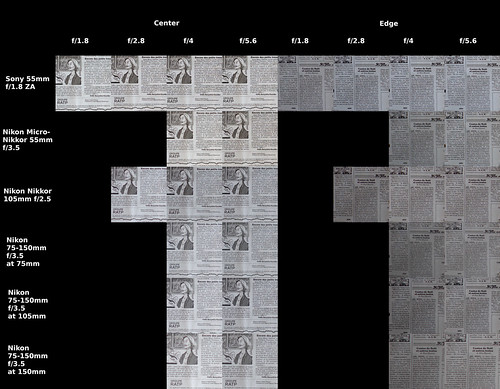
Sony and Micro-Nikkor 55mm, Nikkor 105mm, and Nikon 75 to 150 Comparison


Comments ~

It's obvious.  The Sony 55mm f/1.8 ZA is brilliant from wide open and straight across the field.  As this lens is autofocus, it fits the desired goal of helping this Old Man get decent focus without struggling with the in-camera magnifier and all that.

Perhaps surprisingly, given the decades difference in design dates, the Nikon Nikkor-P 105mm f/2.5 pre-Ai is a Cats Thin Whisker behind the Sony at f/5.6 and straight across the field.  Wide open this little optic is clearly not as sharp as the Sony Zeiss.  It's not bad, mind you.  But in this comparison I can see a difference.

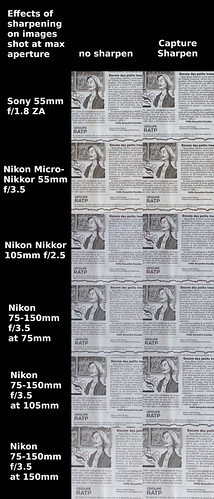
The Nikon 75-150mm f/3.5 Series-E AiS is obviously a touch soft wide open.  And it seems a little behind the other lenses at f/5.6.  If you stare at this long enough, perhaps you might feel as I do that the differences aren't all that great.  To test this, I ran another comparison using Rawtherapee's Capture Sharpen function.  Here are those results -


Wide Open w/wo Capture Sharpen ~ Sony and Micro-Nikkor 55mm, Nikkor 105mm, and Nikon 75 to 150 Comparison


It's pretty clear that Capture Sharpen offsets the AA filter effects of the 24mpixel Sony A7.  What's impressive to me is that the softest 75-150mm focal length wide open is 150mm.  With Capture Sharpen it looks better than the un-Capture Sharpened Sony Zeiss at f/1.8.  The Sony Zeiss Capture Sharpened is nothing short of glorious.

Image processing for absolute best quality must (as has been the case for years) include software.  There's really not much more to say. 


Thursday, March 30, 2023

Ai poses an enormous problem ~ it's much more than image scanning and Copyright issues

[updated 30 March, 2023 - see the end of the post]

The question of Copyright and AI scanners can thundering home recently when I learned that my Flickr images have been included in at least two major AI datasets. So, I submitted the following Help Request to Flick.com - 

Dear Sirs, 

Using tools available to see if my images have been consumed by "AI" scanners I see that, yes, indeed, my Flickr images have been scanned. 

I am very aware of Copyright and it's limitations. I used to advise legal council at the companies I worked for in technology. I did NOT give anyone the right to scan and then use my works. 

I hold copyrights to all but one of my images, and I believe there may be a serious issue by allowing "AI" scanners to do what they are doing. 

What is Flickr's position on this? 

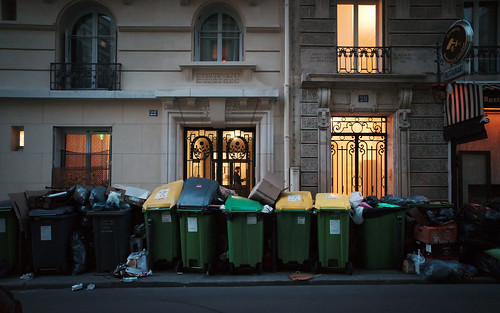
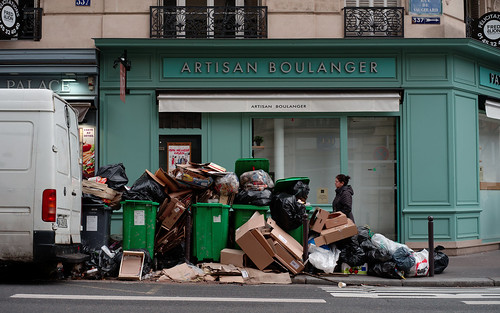
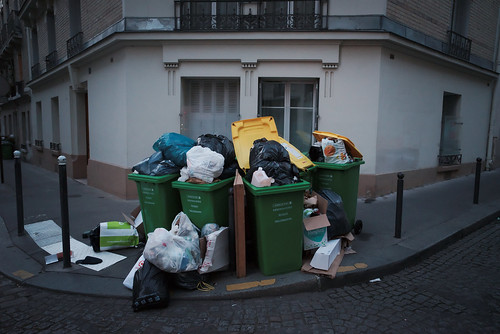
La grève des éboueurs ~ Paris 21 March 2023


Indeed, among may other tasks, I helped advise the lawyers at the last company I worked for.  I'm fairly familiar with what is and is not allowed, and where the gray areas are in copyright law and its application.  Perhaps Flickr had developed a position on the topic?

Their reply, from what I can tell, is likely a lawyer reviewed/sanitized/canned message that gets sent to everyone who asks about AI -

"Hi there,

Thank you for your input on this matter.

As this is a new and emerging space, we have not yet fully reviewed how Flickr will fit with AI images and photography. 

At this time, there have not been any changes to the Copyright Act to address AI generated images.

It is something we are reviewing closely and should there be any changes that would affect the whole platform, we will certainly notify our members.

As always, if there are instances where a creator identifies their copyright or license has taken place, they can submit a claim through our DMCA process for review and actions here.

Best,
Doug

We're updating the terms of Flickr's free accounts to strengthen our community and the long-term stability of Flickr. Read more here.
"

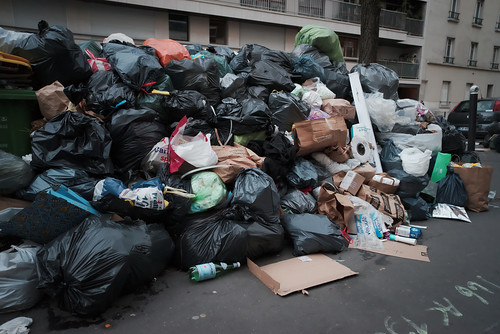
La grève des éboueurs ~ Paris 21 March 2023


First, I fail to see where there is something unique about AI that could require legal redefinition/reapplication.  Secondly, Flickr recently announced a new area of AI generated images where people can post the output of AI software.

It feels as if Flickr is giving this a rather big "pass."

Class Action lawsuits have been filed and I wondered how to join. One site I visited indicated that _normally_ 

"...you don't need to do anything to "join" a class action. If your legal rights are affected by a class action, you usually will only need to get involved once the case settles. In most cases, you will need to submit a claim, either online or through the mail, to receive your portion of the settlement or judgment...

Digging into Flickr's past I found that four years ago it was known that Flickr had been scrapped by an AI in a project that involved IBM. 

"...“This is the dirty little secret of AI training sets. Researchers often just grab whatever images are available in the wild,” said NYU School of Law professor Jason Schultz..." 

One more thing. There was an article published back in 2018 on scrapping Flickr for "deep learning experiments", complete with code to implement a scrapper where it was noted that - 

"...1. It is not legal and ethical to scrape some websites 

2. Even if you were not concerned about the law or ethics, scrapping at scale can be challenging particularly if there are safeguards in place to discourage scrapping...

La grève des éboueurs ~ Paris 15 March 2023


Which begs the question: Did Flickr allow scrappers/scanners, or did they just not care and let it happen?  Afterall, they'd published an API that people could with as they pleased.

Any way I look at it I'm wondering if the benefit stills photographers in the "Pro" program _pay_ for out weighs the huge issue of creative copyrighted works  AI poses and has posed for several years. Flickr may on some level be culpable.

I follow a number of tech websites to try and keep current with the State of Things in science and technology.  Something very concerning turned up just the other day (March 24, 2023 to be exact).

After listening to the podcast I came to the understanding and realization that the problems posed by AI far out-strip the scanning of our images.  

AI is out of control and, if not contained, might pose serious risks to us. As this fire is building to disturbingly large proportions, Microsoft has laid off key personnel from their AI Ethics team.  Isn't _now_ the time to staff-up ethics teams on AI?  What the h*ll is going on?

Ack!  Something very important is happening right this moment and I've not been following the ethical and moral implications of AI as closely as I could have.

If you're at all interested in this topic, have a listen. 

[Update 30 March, 2023] - Some people are calling for an outright ban on AI.

La grève des éboueurs ~ Paris 21 March 2023
 

Yes,the images used to illustrate this blog entry
were carefully chosen to set the mood


Sunday, March 12, 2023

One last Wabbit Hole ~ and it's a whopping BIG one, too!

Accidental Renaissance ~ Retromobile 2023
A little "accidental Renaissance"
to keep things interesting in prep for
reading through somewhat dense material.


[References section updated twice ~ 4 March, and 3 March, 2023]

After whinging and whining about the lack of verifiable, accurate knowledge, I find myself at the bottom of an Enormously Vasty Wabbit Hole.  At the top and just as I fell in I saw it was labeled  "Knowledge You Are Looking For."

The areas I wanted to learn more about but was having a Devil of A Time finding anything useful/correct/truthful included dynamic range, sensor noise, and color depth. I was still poking at the things that might go into defining what a "Fat Pixel" camera might be made up of.

Apologies first: For this blog entry I'm going to move very fast and rather deep.

There are nuances and details that can and should be applied to each of the following statements.  Each step can be an entire study unto itself.  As always, don't trust me, but if you must, make sure you verify.

Here is my present state of understanding.  

Sensor Basics ~

~ There is an analog input side of every sensor ending at analog to digital converters (ADC) with the following components -

  • Light sensitive photo site
  • Analog amplifier
  • ADC

~ There is a digital output side of every sensor starting at the ADC with the following components -

  • Digital image processing chips for stills and video
  • Digital image processing software for stills and video

~ ISO controls the gain on the _analog_ amplifier that feeds the ADC

~ RAW files are made up of the digitized data spit out of the ADC

~ jpg files are the result of the ADC output _plus_ whatever massaging the manufacturer applies on the digital circuitry in-camera

~ In-camera jpg processing _may_ further increase gain digitally (as a second gain function)


Dynamic Range ~

This is the EV difference between highlight areas with detail and shadow areas with detail.  Sensor noise reduces dynamic range.  Said another way, the quieter the sensor the greater the dynamic range.

In general...

~ The broadest dynamic range is seen at the Base ISO

~ The higher the gain on the analog amplifier (increasing ISO) the lower the dynamic range


Sources of noise ~

~ The analog amplifier (where signal gain is first applied) that feeds the ADC and ADC itself are the primary sources of noise in RAW files (see Canon DSLRs)

~ In-camera jpg processing digital circuit may further increase gain and thereby add noise downstream from the analog circuit.  In general, if there is noise on the output of the ADC, unless there is noise reduction on the digital side, we will see noise out of the digital circuits, too (see Canon DSLRs).

Sensors ~ ISO Variant

These are the traditional CMOS sensors that we've all come to know and love.  Until very recently, these were the only ones commercially available to us.

~ The electron gathering well at each sensor site has these properties -

  • Traditional big and somewhat shallow electron gathering well design
  • When used at low ISO settings (ie: low analog amplifier voltages) we get -
    • Broad dynamic range
    • Slight pixel to pixel variations (subtle noise, if you will)
    • Lowest noise/broadest dynamic range tells us what the Base ISO is
  • As ISO increases -
    • Dynamic range decreases
    • Noise increases... maybe... (see astro-photography reference video below about cases where this is _not_ entirely true)

 Recent Sony Design Enhancements ~ ISO invariance

Sensors starting with A6300, A7RIII, A7III, and very obviously the A7SIII, as well as the Sony manufactured MF sensors used in Fuji GFX cameras have _two_ electron gathering wells per photo-sensor site.

~ First electron gathering well at each sensor site has these properties -

  • Traditional big and somewhat shallow well design
  • Used at low ISO settings
  • Broad dynamic range
  • Slight image to image variations (subtle noise, if you will)
  • Lowest noise again tells us what the Base ISO is

~ Second electron gathering well at each sensor site has the following properties -

  • Narrow but deep well design
  • Used for higher ISO settings
  • Shows reduced dynamic range
  • BUT it shows _less_ noise than the big, shallow electron well
  • Highest dynamic range when using this higher ISO than base ISO 1 well-type sets a Second Base ISO
     

Interesting property: ISO invariant sensors tend to show no change in noise as ISO is increased after the Second Base ISO has been switched on.

Note: There are examples of sensors that are ISO invariant from low ISO, such as the Nikon D750 where noise levels do not change from ISO200 on up. See the astro-photography reference video below for the Nikon example.


Comments ~

 Taken as a whole I feel I can begin to understand a few seemingly unrelated things.  Such as -

  • Early Kodak CCD MF sensors showed the best image quality at the time.  This, even if they _expanded_/_amplified_ the ADC output from 14bits to 16bits.  At least they started out at 14bits when everyone else was down around 10bits of RAW and/or stuck at 8bits jpg.  I can see where the "Fat Pixel" ideas could stem from in terms of perceived image quality.  What I've learned is that modern sensors can easily outperform the original Kodak MF sensors in every measurable way, _and_ we get ISO flexibility with current sensors where Kodak worked best at Base ISO, period.
  • I now see (on Photons to Photos - see reference link below) the differences between the old 14bit ADC Canon 5D MkII and 7D sensors and the _12bit_ ADC Sony A6000.  In one release of products we went from "ya, that's not bad but if we're not careful there's loads of noise in the shadows" to "wow! now there's a clean image".  The A6000 has more dynamic range at 12bits ADC and, as hoped for, less noise than the older 14bit ADC Canon sensors.  There is likely something about Canon's analog circuit that was rather prone to the introduction of error.  It's interesting to me that it's only with the release of Canon's new mirrorless cameras that their sensors seem to meet or slightly exceed the early Sony FF sensors.  This tells us something about how much work Canon has done on the analog side photo-site to ADC path.
  • Looking (again on Photons to Photos - see reference link below) at first generation Sony A7, A7S, and A7R, there's not really all that much difference between these models in terms of dynamic range and noise.  Yes, the A7S has slightly better dynamic range than the A7, but I'm not sure I'll ever actually see or appreciate the extra 1/3stop EV the A7S has.  I've read where we can begin to see differences of 1EV dynamic range, but I haven't verified that for myself.  Coming back to the Photons to Photos information, the A7R looks nearly as good as the A7S.  In the end, if I can't make a great "Fat Pixel" image with any of these three cameras, I'm doing something drastically and dramatically wrong.
  • ETTR (Expose To The Right) "works", but not for the reasons we're commonly told.  It "works" because we are able to bring the dark areas up out of the base level noise.  Of course we have to guard against saturating the highlights beyond recovery, but once the data has been collected, it's more flexible in processing than images where the dark areas are down in the noise base of the sensor.
  • ETTL (Expose The The Left) "works" as expected.  We use ETTL in black and white photography as a "lazy man's way" of guaranteeing as much detail in the highlights as possible.  This can closely emulate film images when processed appropriately.  The highlights are raised in processing and the shadows raise with the highlights. As an aside, I've started to use Zebras to know when the highlights are saturated.  Coming back to ETTL, with quiet sensors we might be able to avoid distracting noise to the shadow areas.  Which leads me directly to the next item.
  • One of the problems I had trouble understanding why there is so much noise in the shadow areas of severely under-exposed images even at 100ISO where I thought we should see the lowest noise everywhere across a broad dynamic range image.  It turns out the noise is easily explained.  The electron gathering wells aren't able to gather enough information consistently across the wells to make the dark areas appear as smooth as the light areas.  The light simply is not available at those low levels to distribute evenly. Hence noise, even at 100ISO.  To avoid this problem in a single shot, use ETTR or better yet Zebras.  If the dynamic range of the scene is broader than a sensor can handle, there's HDR and image stacking during processing.
  • Potential recent "Fat Pixel" candidates could be the Sony sensor manufactured Fuji MF GFX cameras.  Their dynamic range exceeds by 1EV the best Sony FF.  The MF Fujis are well above my current Pay Grade and I doubt we'll ever see them go for less than 1500USD used.  Yes, I know.  The 50R is trading hands on the used market for around 2250USD.  It's still too rich for me.  But there is something to be said about well-engineered sensor development and ISO invariant circuitry.  Kodak sensors were never ever close to being this good.
  • I now understand why backside illumination of a sensor "works."  By raising the black base to a known level, sensor noise levels are suppressed by starting at zero (pure black) well above the potentially noise inducing analog circuits.  It's a neat trick, actually.  I feel there are some creative solutions being applied to sensor design these days.  This is Fun Stuff.
  • Pursuing the absolute best color depth, longest dynamic range, and lowest noise images possible requires a static subject, a tripod, setting the camera at its Base ISO 1, and shooting three or four identical images.  Three image stacked low ISO photos "work" because the process averages out the subtle fat/shallow electron well variations.  The final output image quality should easily exceed that of, well, just about anything.  And speaking of which...
  • Sony has come up  with something interesting in their dual Base ISO sensors.  While destined for video work, I can see where there will be benefits for us stills shooters, too.  Even if we're stuck at 8EV dynamic range at Base ISO 2, I'm still struck by the possibilities of lower than Base ISO 1 noise.  
It's a Crazy Topsy Turvy Counter-Intuitive World out there and I can't wait to see what the Sensor Development Wizards come up with next.

Until further notice I have stopped reading the thoughts, evaluations, and conclusions of the vast majority of popular still-photography related websites.  In general they are at a distinct lack for meaningful data on sensor performance, dynamic range, color depth, and noise characteristics.  I know they're "trying" the best they can, but I've found that I have a difficult (Gear Grinding) time with the Marginal at Best "test" methods and bad data they attempt to analyze and justify their conclusions with.  It's become just "noise" to me.
 
Sometimes a person has to dig deeper to get at truth.
 

References ~ [updated/modified on 4 March (correcting a link to the most important video, the first, and updated slightly on 3 March, 2023]

Here is a video with very clear, concise explanations of Sony sensor behaviors.  

I had to pause the video every other sentence, or so it seemed, so I could stop and think about and think through what was just said.  There is so much _good_ information here.  In fact, _this_ should be the reference for discussion of sensor performance.  I wish more of YouTube was this accurate and informative.  I've found there is too much "squishy thinking" go'n on out there!!!  So this is an absolute breath of fresh air.  

It's easy to see how much this video influenced the organization of my thoughts.  While I knew various pieces and parts of the process, the video helped me organize what I knew into a cohesive whole.  In fact, I've borrowed from the video outline in the writing of this piece because I found it that useful.

Photons to Photos has a great site on measured dynamic range, noise, and sensor performance. Complete with methods and rationale explaining what they do and why. For some reason I've not run into this site until now.  There were many spent hours looking around, reading, and comparing various sensor data.  It's amazing how much a person can learn if they're patient and aware and take a few notes along the way.

Here is a video on ISO invariance and why it's interesting and useful.  There are also comparison images showing how ISO variant and invariant sensors behave differently. 

I often wondered what changed with the introduction of Sony's cameras around 2012.  Reading Jon Rista's explanation from 19 January 2015 - 01:30 PM gives a clue.  While I might not agree that 500nm waffer technology was a problem (except as an example of Canon not keeping up with the latest waffer fabrication trends), the rest of his argument rings true.  Further, Jon Rista gives us a few potential clues about "Fat Pixel" photo-sites from Posted 29 January 2015 - 12:09 AM (pay attention to his comments on photo-site area and electron well capacities). For a Geek who really wants to Geek Out it's very interesting and potentially practical stuff

Lastly, here is a link to a Wiki page where we can see a Sony camera and function matrix.  In addition, Sony has a matrix of ADC bit depth information.  This too is organized by camera and function.  Using this information we can begin to guess how much circuitry is implemented in the various cameras that influence things like read speed and camera capabilities.

To me the most important outcome of all the Geeky Nerdiness is the acquisition of knowledge that can be applied and balanced in the real world when pursuing highest possible image quality.

Update of a common 'net expression from when dinosaurs roamed the earth: Base ISO 1, f/8 and be there.  

If it's dark out, Base ISO 2, wide open and be there.
Tuesday, February 28, 2023

Reconsidering the Sony A7S... [part Three]

My Gears have been GroundI have vented my spleen.  And I feel I finally have my arms around the nature of the problem.

The problem is this: Many of the camera review sites post numbers grading various aspects of sensor performance that are for various reasons problematic.

I don't yet have a solution to the problem.  All I know is that converting images to TIFF, using in-camera JPG processing, or image downsizing to "normalize" (whatever that means in the context of dynamic range and color depth) all have their problems from an image quality measurement and comparison point of view.

Further, I don't see a way to evaluate if Sony's claim of 15EV+ dynamic range for their A7S is "real" or not. I'm not sure if this small 12mpixel Full Frame sensor-ed device is part of the "Fat Pixel" family of Mythic Pixie Dust cameras.  If it is, how might we _see_ or _measure_ the Magic?

Not knowing entirely how to proceed I will set all this aside and go have a long think.

In the meantime, the friend who shared how some standalone Noise Reduction software can work its magic on noisy images suggested something to me.  If I had a problem with downsizing A7R images to A7S image size (where the downsized image is _always_ better with large sensored cameras in DxOMark and DPReviews reviews), why not upsize the smaller image to the A7R size?

Hence this blog entry.

Over on YouTube there is a video by a woman who printed a couple A7S images to 47 inches long.  That's rather big, right?  Is it any "good?"  Hmmm...

There's a guy who ran a comparison study with two photographer friends where they tried to see any differences between A7S and A7 (24mpixel) prints.  It seems that differences between the A7 and A7S are best seen when comparing identical images.  When looking at standalone prints it seems much more difficult to tell which print was made by which camera.

Then there is the ability to upsize images in a somewhat meaningful way.  I've been looking at this a little and have to say, the results can be impressive.

There's lots of food for thought, here.

Setup~

  • Sony A7S image opened in the Gimp
    • Upsize from 4240pixels to 7300pixels
    • Apply 1pixel USM in upper layer with 70% opacity

Comparison ~


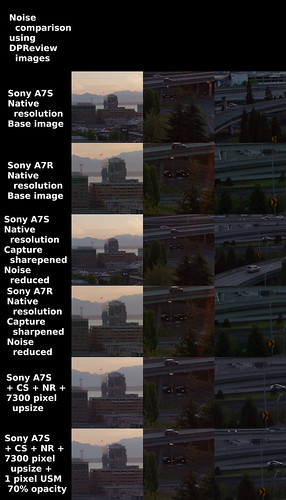
DPReview image

DPReviews base image 

DPReview image ~ reworked 

Processed image

Sony A7S vs A7R IQ Comparison 3


Comments ~

Let's start by looking at the 2nd, and 5th rows of images.  The 2nd row shows the native file size Sony A7R at 100 percent.  No noise reduction nor Capture Sharpen were used.  When I started this WeeLookSee I thought I might see a clear difference in resolution since the A7R has no AA filter and the A7S does.  So if this is as sharp as the A7R is without any further processing, have a close look at row 5.

Row 5 is the A7S image Rawtherapee Capture Sharpened and noise reduced, _then_ upsized 7300pixels long using the Gimp NoHalo algorithm.  Pretty amazing, isn't it?  Stare at it awhile.  Still amazing, right?  The most obvious difference to me is in trying to read the "One Way" sign in the middle of the center column of images.  Amazing.

Now let's have a look at rows 4 and 6.  Row 4 is the native file size A7R image with Rawtherapee Capture Sharpen and noise reduction.  We can just begin to be able to read the "One Way" sign.  Noise is reduced.  The over all image is looking not half bad.  Row 6 is the upsized A7S image with a 1 pixel UnSharp Mask applied.  While it looks pretty good, it should be obvious that there is more detail in the A7R image.

Lastly, looking at just the A7S upsized images in rows 5 and 6 and not trying to compare them against any of the A7R images, what do we see?  They actually look pretty good, don't they?

While I knew it already, this exercise re-enforces to me that software can play an important role in image processing.  When done with care, upsizing the 12mpixel A7S to A7R dimensions can yield interesting results.  

As I wrap up this blog entry I have to confess that I've had that long hard think.  I've thunk a bit.  I've cogitated some.  I've studied a lot.  I've learned a bunch.  I've _finally_ found a Vein of Knowledge that is proving rather useful.  

Yes, Martha, there is One More Wabbit Hole to fall down.

Sunday, February 26, 2023

Reconsidering the Sony A7S... [part Two]

I guess my Gears are easily Ground.

It started many years ago when I rode motorcycles.  My Gears were Ground by various reviewers who either said things that were silly, all too often wrong, or failed to mention things that would be important to a rider.

The first example is of a review written about a Kawasaki touring bike.  The reviewer noted all the usual things, except one.  The tourer had a clearly _over_ spec'd alternator.  Why would that be? Well, Kawasaki knew that buyers of their tourer would want to add accessory lights and things that would use the extra juice.  But reading the review, no one ever knew what the standard issue bike was capable of.

The second example involves the early Ducati 900SS.  They are narrow, light, and made sufficient horsepower to throw you down the road at 135mph in stock trim.  More importantly was the fact the bike was rock solid stable at all speeds. It was like riding a laser beam.  I kid you not.  The stability instilled a certain confidence.

Compared with this, Japanese motorcycles from the 1980's tended to wander, have slightly vague handling, and might induce a "tank slapper" under the wrong conditions.  I know these things first hand because of the RD400, 550cc Vision, 650 Seca, GS500, and three road-worthy Ducatis (bevel and belt-drive) I used to own.  Fortune was really on my side at the time as I got to ride one-each of every model bike ever made or imported to the US during the early to mid-1980's. I accidently bounced the valves of a Kawasaki 750cc Turbo prototype.   14,000RPM was a bit beyond spec, but the bike survived with zero problem.  Yet it was the Ducati that instilled confidence.

This is what I look for in reading reviews. Confidence.  I want confidence that people know what they're talking about.  I want confidence that their findings are worth considering.

A photography example of what I mean comes from reading just about anything written by Geoffrey Crawley.  His reviews were in-depth, concise as possible, and informative.  If there is a detail that he felt was important to share, he would expand the subject until everything became clear, such as when he wrote about the 1/1000th of a second top speed of the original Nikon F.  I have confidence that he knows what he's written about.

Similarly, I enjoy reading Roger Cicala at Lens Rentals. He posts not just his findings, but _how_ he got to those findings in the first place.  He publishes his methods and _reasoning_ behind those methods.  It's a real joy to read, learn, and understand.  M. Cicala instills confidence.

What fails to instill confidence is when well-established reviewers make decisions, "test" something, assign numbers, and post the "results" without sharing at the same time clear methods and limitations.  Specifically, converting images to TIFF, using in-camera JPG processing, or image downsizing to "normalize" (whatever that means in this context) all have their problems from an image quality measurement and comparison point of view.  But I never knew about the limitations until I dug into the subject.  Information wasn't easy for me to find.

Why is any of this even remotely important to me?  I prefer accuracy and full truth so that I can make the best informed purchase and use decisions that I can.  I'd like to be able to consider the trade-offs as they really are.

In the case of the Sony A7S, I passed on two inexpensive, good condition examples thinking that they were of lesser stills image quality than the A7 or A7R.  I'm not sure what the real answer is, but I'm learning it's not exactly how I read about it on various "reviewer" sites.  Of course it's too early for me to know if it's worth plunking down good hard earned money for one. 

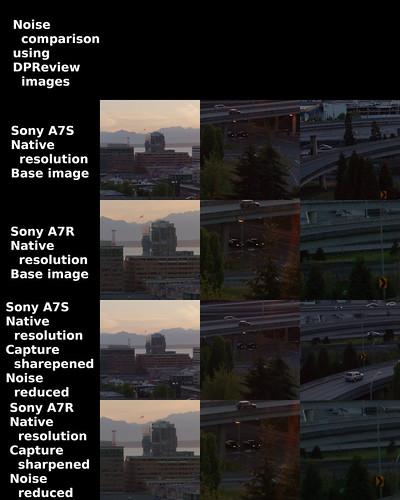
Building on the previous blog entry, I was interested in seeing what happened to Sony A7S and A7R DPReview supplied sample AWR (RAW) images when I applied Rawtherapee Capture Sharpen and Luminance Noise Reduction.  Capture Sharpen should be obvious since the A7S reportedly comes with an AA filter.  Noise Reduction would be applied to see if the heavily amplified dark areas of the scene could be quieted down.  The A7R dark areas in particular look to me pretty ghastly at the native sensor resolution image size compared to the A7S.  Perhaps noise reduction could help the A7R image?

Setup~

     NOTE: the DPReview images were 1.7 and 2EV underexposed and filed under the heading of "Dynamic Range in the real world."  They were trying to share something they "saw" regarding noise control and dynamic range.  So I needed to do what they did, raise the shadows to the point the overall image looked somewhat OK, then consider the noise and dynamic range, particularly in the dark amplified areas.  Where DPReview used Lightroom's Exposure Value slider, I used Rawtherapee's Lightness so as to avoid blowing out the highlights.

Comparison ~

DPReview image

DPReviews base image 

DPReview image ~ reworked

Processed image

Sony A7S vs A7R IQ Comparison 2


Comments ~

Considering how dark the shadows are in the original un-modified image are, they were shot 1.7EV and 2EV under-exposed, the processed results are rather amazing.  I could never ever dig this deep into the shadows with my old Canon DSLR systems.  Sony has done a great job.

Looking again at the original native size images, the A7R shows more noise than the A7S in the shadows.  To me the difference is obvious.  I'll say it again, the A7S native size image heavily amplified shadow area image shows _less_ noise than the native size A7R image.

Then I did two things.  I Capture Sharpened each native size image and Noise Reduced them. 

The Capture Sharpen step makes the A7S image very crisp and sharp-looking.  The A7R gets that little bit of extra sharpness, too.  I've come to like using this function early in my image processing.  Images don't look overly sharp to my eyes.

As I've said else-where, what surprises me is that the A7R no-AA filter image isn't sharper looking than the AA filtered A7S.  I'm not sure how to evaluate this.  Though perhaps it should be noted that the "One Way" sign is nearly readable in the A7R Capture Sharpened/Noise Reduced image.

Looking at the effect of Noise Reduction on the A7S and A7R image shadow areas gives just about what we might expect.  The A7S goes from a small noise to even smaller noise patterns.  The A7R goes from moderate sized noise to smaller though still obvious noise patterns.

A friend sent me samples of what can happen when using a specialized noise reduction software.  The results are impressive.  In fact, I can easily imagine that a properly-processed very under-exposed image can be massaged into something pretty darned nice.  My suggestion would be if the highlight areas aren't showing noise, then mask the shadow areas and apply noise reduction there.  At which point we've crossed over from considering the sensor to taking advantage of advances in image processing software.

Coming back to sensors and working with several Sony A7S AWR (RAW) sample images downloaded off the 'net I feel I'm beginning to understand what Michael Reichmann was saying about medium format sensors and the A7S.  I'm not sure it adds up to much.  I don't hear people raving about the A7S image quality over, say the A7 or sensors from other camera manufacturers.  Perhaps it only matters when the winters are dark, cold, snowy, and I have way way too much time on my hands, but I think there _might_ be something there.

Chasing Pixies has become my day job.  

Oh, but I have one more step to take in this Wacky Adventure.  Stay tuned for part Three.

Friday, February 24, 2023

Reconsidering the Sony A7S... [part One]

I'm still thinking about the Sony A7S.  I'm not sure why, but I am.  Er, well, yes, I do know why I'm still thinking about it.  Something is Grinding my Gears.

Michael Reichmann wrote some years ago about how the A7S files "felt" similar in quality to the Kodak CCD medium format sensor output.  I couldn't help but notice he didn't say the same thing about the A7 nor the A7R sensors.  Both cameras had been on the market a year before the A7S was introduced.  

The 24mpixel A7 camera produces even now beautiful images for me.  What could be better?  Well... maybe there was a years worth of developmental "baking" of more quality into the A7S over the earlier sensors?  Or, as was the thought at the time, the 8,4micron photo site size the Source of Fat Pixel Goodness?

I read the DPReview review of the A7S, found and downloaded two ARW (RAW) samples.  I thought it might be interesting to see how they behaved when subjected to my standard image processing using Rawtherapee and the Gimp.  It feels like there might be an opportunity to learn something using someone else's comparison images.


Setup~

    NOTE: the DPReview images were 1.7 and 2EV underexposed and filed under the heading of "Dynamic Range in the real world."  They were trying to share something they "saw" regarding noise control and dynamic range.  So I needed to do what they did, raise the shadows to the point the overall image looked somewhat OK, then consider the noise and dynamic range, particularly in the dark amplified areas.  Where DPReview used Lightroom's Exposure Value slider, I used Rawtherapee's Lightness so as to avoid blowing out the highlights.


Comparison ~

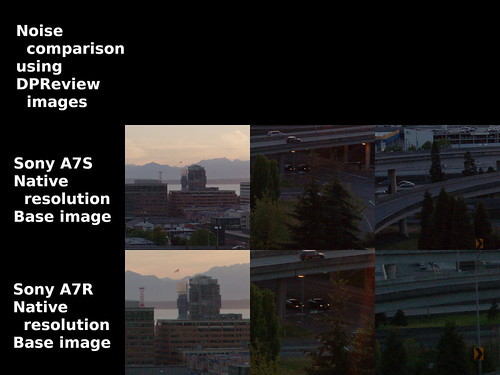
DPReview image

DPReviews base image 


DPReview image ~ reworked

DPReviews base image
with my processing applied


Sony A7S vs A7R IQ Comparison 1


Comments ~

The rather heavy Rawtherapee processing was needed to bring up the shadows of the two under-exposed images borrowed from DPReview.  These images are trying to stress the image capture system by amplifying (expanding) the dark areas so that we can evaluate things like dynamic range and sensor noise (particularly in the expanded/raised shadow areas).  Most of the time many of us would never shoot a photograph in the real world in this way, and as we will see in future posts, I have questions about the validity of this as a test method.

The 100ISO base image at native 4246x2840 pixel resolution Sony A7S image looks smooth in the light areas, and slightly noisy in the deep and now raised shadow areas.  This is pretty remarkable to me, particularly when I look at the base uncorrected image and compare it to the lightness and curves processed result..

To my eyes the A7S has lower noise than the 7354x4912pixel A7R image.

We were led to expect this, right?  Seems intellectually correct.  Lower pixel density sensors have lower noise than sensors where the photosites are packed in like sardines, right?

So what's my Gear Grinding problem?  Well, here it is.  DPReview wrote "... Who wins? In a nutshell? a7R, hands down..."

Please tell me my eyes are really bad, or tell me that we see the same thing.  I don't see where the A7R image "wins" in any dimension except size (har!).

The Gear Grinding problem is partially explained in the next sentence.  "...we've downscaled [emphasis mine] the a7R image to the a7S' 12MP resolution, the a7R offers more detail and cleaner shadow/midtone imagery compared to the a7S. Downscaling the a7R image also appears to have the added benefit of making any noise present look more fine grained; the a7S' noise looks coarse in comparison..."

This is where they have me really and honestly Gear Grindingly stumped.  If you're trying to compare image qualities between different sized sensors, why on Gawds Green Terra Firma would someone want to downsize a larger image to the smaller sensor dimensions?  

I'm serious.  Why?  What does it show?  What does it prove?  How would it be relevant to photography except when someone is willing to throw away potential resolution to, what?, prove an Obvious Point?

The Obvious Point being that something called "pixel binning" or downsizing works.  Noise across an image will be averaged out (or reduced).  With that will come more accurate colors (averaging out the chromatic variations brought, in part, by subtle noise, even at low ISOs).

What if, instead, reviewers were to take a 4240 pixel long section out of the A7R and compare directly like size image to like size image?  Adjust for image field by correctly selecting the focal length, of course.  Wouldn't that make for a more honest evaluation, if what you're trying to evaluate were things like dynamic range, color depth, resolution, and noise?

And speaking of resolution, the A7R reportedly comes without an AA filter and is supposed to be sharper than those that come with AA filters (such as the A7 or A7S).  And yet, the A7S appears to deliver resolution as well as the A7R.  Here is Yet Another Wabbit Hole to fall down, but we'll save this for another time.

In the end the DPReview provided AWR RAW sample A7S image looks to me to be smoother and sharper than the A7R _before_ I apply any noise reduction or capture sharpening.  I'll make those adjustments in part Two of this series so we can begin to see what the differences might be as we start processing an image.  

For the moment, however, can someone explain to me like I'm in kindergarten how downsizing an A7R image to A7S dimensions gives us a valid departure point for understanding relative image quality?