Saturday, April 24, 2021

Orthographic film emulation ~ a real world scene

As I said at the start of the prior post, someone who's work I'm following and who's PhD thesis on pictorialist lenses I've closely read posted something that captured my attention.  I find this and other images of his very charming. As you can see from the EXIF it is an image made using an old single coated lens Zeiss Ikonta B film camera using Orthographic film.

As background information, Ortho film is very sensitive to blue light, minimal sensitivity to green, and zero sensitivity to red.  This was the way _all_ black and white images were before the invention of panchromatic film.  Panchromatic film is sensitive somewhat equally to all visible colors in the spectrum.  It was invented in the early part of the 20th century and is still commonly available.  On the other hand, Orthographic film tends to be difficult to find today.

After creating a digital emulation of Ortho I wanted to see how it behaved in the "real world."

Keep in mind that this is just one image.  To really "know" and understand something takes a bit of effort and many questions will not be answered in a single photograph.  However, I found the following example to be interesting.

The approach I used was to set the exposure/contrast/vignetting levels where I wanted.  Then I moved the mid-section of "Curves" up the range to lift the mid-tones and to ever so slightly flatten the highlights.  I will explain this further in a moment.

NOTE: I learned several things from a series of articles that Mike Johnson has posted over the years about converting digital color to black and white.  In digital conversions to Black and White -

  • Expose for the highlights and process for the shadows - this is the exact opposite of what you do in film photography.  In fact, digital conversions, what with modern sensors and all that, tend to show more detail in the shadows than in traditional film.
  • Luminance - Remember that the human eye perceives same energy colors differently.  For instance, we see blue darker than we see same energy green.  This is how, in black and white photography, we can begin to see what photographers call "tonal separation."  It used to be that "tonal separation" was the Holy Grail of great B&W photography and it was very difficult to control.  This isn't surprising as a simple desaturation without taking into account how the human eye sees colors can produce a Muddy Mess.  I have taken to using luminance, unless I'm working to achieve a specific "look", such as what I'm trying to illustrate with this Ortho film emulation.  With regards to "looks", a good digital B&W conversion can "look better" than film.  I know, more heresy.
  • Lift the mid-tones - I use "curves" to pull up the mid-tones and to slightly flatten the highlights.  This is, actually, one of the "secrets to success" for converting digital color to Black and White.  Why?  Because in B&W photography we printed our negatives to paper.  Paper, it turns out, lifted the mid-tones.  If paper did not lift the mid-tones, we would have had a world filled with Muddy Messes of non-luminescent grays.  Try it sometime.  Take a digital color image and convert it to B&W.  Then gently lift the mid-tones and watch what happens.  If the image is too bright, bring the "lightness" down Do not use "exposure" to do this.  "Lightness" preserves the highlights regions where "exposure" brings the entire exposure range down the curve.  Or take an old B&W negative and scan/photograph it and invert the values.  You will see the Muddy Mess I'm talking about. And then lift the mid-tones using "curves", et voila!  Immediately you will recognize print tone values.  It's magic.  Trust me on this.
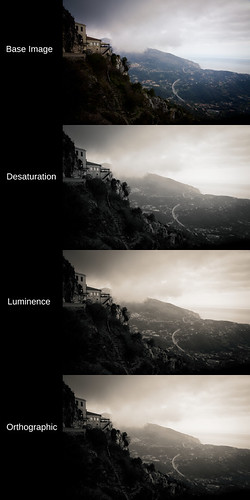

Black and White digital image conversion comparison


As you can see this scene from a viewpoint at Sainte Agnes, France has muted, mixed colors.  The buildings and foreground vegetation are warm in tone.  The sky and horizon are blue.

Looking at the simple desaturate method output and comparing it with the human perception model (luminance) conversion shows what we might expect from modern black and white film as well as de-saturation converted digital color images.  The desaturate image is nothing to write home about.  The luminance conversion shows better tonal separation.

Considering the Ortho image, we can clearly see where the blue portions of the scene are lighter than in the other two conversions.  Overall, it looks as if there is more moisture in the air.  It begins to have that Orthographic film "look."

If you want to fully emulate the old Ortho film look, study where early photographers placed the exposure value and emulate that.  It can be an interesting exercise.

Wednesday, April 21, 2021

Orthographic film emulation ~ Black and White photography

Someone who's work I'm following and who's PhD thesis on pictorialist lenses I've closely read posted something that captured my attention.  I find it very charming. As you can see from the EXIF it is an image made using an old single coated lens Zeiss Ikonta B film camera using Orthographic film.

Ortho film is very sensitive to blue light, minimal sensitivity to green, and zero sensitivity to red.  It can produce a distinctive "look."  In fact, this was the way all black and white images were before the invention of panchromatic film that was sensitive somewhat equally to all visible colors in the spectrum in the early part of the 20th century.

Working in digital and using color channels we can emulate Orthographic film.  The recipe is very simple.  Set the color channels in your processing software's Black and White conversion module as follows.

  • Blue - 100
  • Green - 33
  • Red - 0

Simple as that.

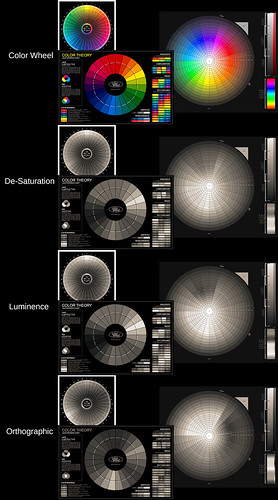
In the following example we can see the original color wheels in color.  This is followed by the color wheels de-saturated.  This method is what I thought digital cameras used to generate/process in-camera black and white images.  Afterall, it's how panchromatic film (more or less) works.

Happily Sony proved me very wrong on this point.  But it is the only method available to Leica in their black and white only cameras.  In this sense Leica black and white images are no better than using old panchromatic film.

After that comes the human perception model luminance color conversion.  Remember that the human eye perceives same energy colors differently.  We see blue darker than we see same energy green.  This is how, in black and white photography, we can begin to see what photographers call "tonal separation."

As I said, Sony's in-camera black and white images don't simply desaturate a scene.  They use, instead, this human perception model conversion.  It's brilliant, actually.  Tonal separation in-camera.  Now who would've thought?  :-)

Finally, we will see how the Orthographic film emulation effects the outcome of the color wheel conversion.  Pay close attention to the visual intensities between colors.  Things change pretty obviously compared with the prior two black and white conversion methods.  Using this approach, perhaps we can begin to emulate the "look" of pre-panchromatic film images?  Let's have a look, shall we?


Black and White Conversion Comparison


Coming back to my friends work for a moment, is what makes his images charming the old Zeiss Ikonta B camera and its uncoated lens?  

Is it the Ilford Orthographic film that he uses that makes his images so wonderful?  

Perhaps, is it the processing chemicals that he's using and the subtle grain his images have?  

Is it a combination of these things, or something else entirely?

Monday, April 19, 2021

Super Resolution ~ Comparing the three methods [part 4/4]

In this blog entry I would like to do the glaringly obvious and compare sided by side the results of the three different methods I tried for creating "super resolution" images.

The three methods are Cubic Up-Rez with USM, Image Stacking, and Image Stitching methods. 

This started after reading articles on Photoshops "new" function that up-rez's an image.  This, of course, comes on the heels of Topaz AI somethingorother "super resolution" product.  The "super resolution" technique has even been applied to cell phone images.


REMINDER: Increasing image sizes using "super resolution" software products does not add information.  If data isn't in the original file to begin with, it will not be added by increasing the dimensions of the image.  This is potentially important as some software providers imply that Artificial Intelligence (AI) is being used to improve an image in ways that were not previously possible.  This is a demonstrably false implication.  Don't fall for it.


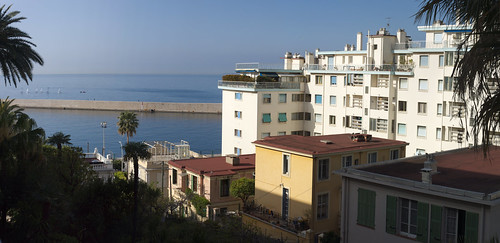
One last time, here is the base scene that I will work from.

Base Image ~ "Super Resolution" comparison ~ 2021


In the following comparison I show the base image as processed in RawTherapee and with "Capture Sharpen" applied.  Then I selected what I felt were the best representations, best results of the Cubic Up-Rez, Image Stacking, and Image Stitching methods.


Best Output of 3 methods ~ "Super Resolution" comparison ~ 2021


I ordered the "super resolution" results in order of preference, from best to worst.

Let's start with the worst method.  Or, in the very least, the most difficult method to manage, and that is the image stacking technique.  I've tried this method many times and I fail to see how information is added to the final up-rez'd output.

It sure seems to do a great job on smoothing out the noise, however, but I struggle to see where details to a scene are actually increased. So I'm left wondering what I've done wrong, or what I've not been careful enough about?  This approach certainly works in the Olympus and Sony products (I think Pentax offers this, too, on some of their products).

Given the poor results, I've decided that if I really really need to increase image size and if I only have one image, then the next method is the way to go.

Using the Cubic interpolation coupled with USM light/careful/undramatic sharpening to increase image size can be rather good.  

There's an important secret and this is to set the interpolation sample rate at least 2x higher than the native image dpi.  Many software set the native file resolution to 300dpi.  Therefore, when using the Cubic interpolation method, set the sample rate to at least 600dpi.  I like 1200dpi when using the Gimp.

If you are not using the Gimp to process your images (and most people do not use this Open Source Software) you will need to confirm that the interpolation filter is actually working correctly.  I have seen where too many software allow you to increase the sample rate, but then that selected sample rate is not applied (for some strange reason) and the output image ends up being "blocky" and "pixelated."

When done correctly and if you start with a "clean file" (ie: well controlled noise) the USM sharpened Cubic Up-Rez'd output looks pretty good.  This is as good, in fact, as anything I've seen from the new Super Resolution products, because, as I said earlier, those products aren't really bringing anything new to the table.

Picking at a favorite scab of mine, I've found that the Sony APS-C sensors (even the 10+ year old sensors) out-perform Canon's current Full Frame sensors at low ISO when using the Cubic USM method.  Canon CR2 raw images have a lot more noise in the shadow areas than Sony AWR raw files.

Moving on to the final, and obviously best way of making "super resolution" images, we come to Image Stitching.  This is clearly the best way of making bigger images and retain all the resolution of the cameras sensor.  There are no imaging tricks trying to increase apparent resolution, here.  We are simply dealing with native off the sensor resolution, which can be pretty darned good.

So there you have it, my recommended methods for how to increase image size.  If you have time and a subject that isn't moving, and if you need a large "super resolution" image file, use the Image Stitching approach.  If you don't have the time, but you still need a larger image file than what you can get natively out of your camera, consider using the Cubic Up-Rez with Unsharp Mask image sharpening approach.

Saturday, April 17, 2021

Super Resolution ~ Image Stitching [part 3 of 4]

Previously I covered a simple cubic up-rez + USM "super resolution" technique and image uprezing stacking + two sharpening tools.

Continuing to look at how "super resolution" images can be made, I turn my attention now to image stitching.  This is where you take a sequence of images that are smaller portions of a scene and then stitch them together to create a large image file.

To reiterate, this topic re-started for me when some folks talked about Photoshops "new" function that up-rez's an image.  There are comments that Topaz AI somethingorother is better.  And, of course, there have been comparisons showing how "good" an up-rez can be these days.  But before all this there are the original instructions on how to image stack to hopefully gain resolution during an up-rez (ie: Olympus or Sony sensor "wiggle" functions).

Here is a third way to try and gain image resolution.  Using a cameras native sensor resolution, the goal is to take a number of section images that can be stitched into an image of potentially far greater resolution.  The technique is extensible and is at the basis for the creation of "gigapixel" images.

A much smaller (and therefore much easier to manage) than "gigapixel" is the image stitching approach I use here for this demonstration.

  1. Take a number of handheld images of portions of a scene
    NOTES:
    • It can be helpful to set the camera to manual mode where you determine the shutter speed, aperture, and ISO.  This will keep the exposure consistent between images, particularly when there are brighter and darker areas that the cameras exposure system might try to compensate for as you take each section image.
    • Make sure you overlap adjacent images by at least 20percent.  Some practitioners have suggested a 50percent overlap between images.  The photo stitcher will need enough information between images to match the sections that will build the final output
    • If your subject is fairly close, you might benefit from making sure you swivel the camera around the optical nodal point of the lens.  Otherwise there will be position differences between images that the stitcher may have a difficult time matching.
  2. If you shoot RAW format, process images using the exact same actions/steps/processes. 
    NOTES:
    • Do not compensate for exposure.  Choose one set of curves or contrast/lightness/exposure settings and use these for every image.
    • Apply the exact same lens profile to all images.
    • Correct for vignetting in the lens profile, too.  This will help the image stitcher to not work too hard to keep the image to image transitions smooth.
  3. Load the images into a photo stitcher and create a large image from them smaller image sections.
    NOTE:
    • If the stitcher can write 16bit tif/psd/xmf formatted output, you can then process the image to completion using your processing software.  This can be helpful for further color corrections, applying a decent vignette, and any action that benefits from a 14bit or 16bit color depth.


Here, one last time, is the base scene that I tried to emulate.

Base Image ~ "Super Resolution" comparison ~ 2021


Here is the stitched image. 

Stitched 6 images ~ "Super Resolution" comparison ~ 2021


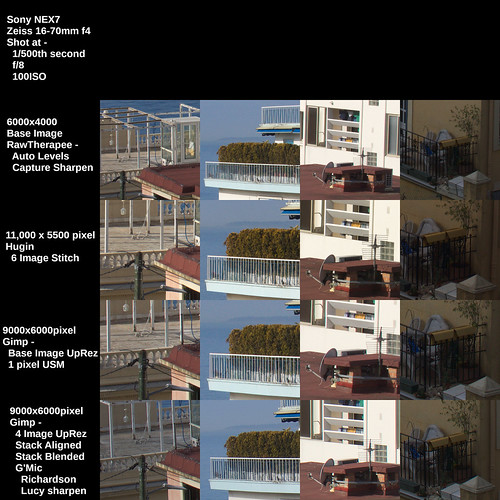
As you can see, it is broader than the above scene, as I took more image sections on either end of the scene.  Also note that the final output, while over 11,000 pixels long is only 5,500 pixels high.  I used a 6000x4000 24mpixel Sony NEX7 and there was just enough "drift" between the handheld image sections that I lost 250 pixels top and bottom.


Stitched Image ~ "Super Resolution" comparison ~ 2021


Now we seem to be getting somewhere.

The stitched image retains all the "Capture Sharpen" goodness that the smaller section files contain.  There's really no need to sharpen any further.

For grins, however, I did exactly that.  I sharpened this already very sharp image.  When is "more" ever too much?

An UnSharp Mask (USM) of 2 pixel width and 0.5 contrast step takes the big image resolution "over the top".  If you like the effect, then here you go.  You'll get nothing sharper.

Using the Richardson Lucy sharpened image looks even more "over the top", but it is starting to look "artificial" and "water colory."

OK.  I'm done for today.  I will reserve further comment on this approach until the next blog entry where I will try and sum up my findings from three different "super resolution" methods.

Friday, April 16, 2021

Super-Resolution - Image Stacking + Sharpening [part 2 of 4]

Previously I covered a simple cubic up-rez + USM "super resolution" technique.  In this blog entry I would like to cover a second "super-resolution" technique.  This involves up-rez'd image stacking.

This all re-started for me when some folks talked about Photoshops "new" function that up-rez's an image.  Some people think it's the cat's meow.  Others point out that Topaz AI somethingorother is better.  And there have been comparisons showing how "good" an up-rez can be these days.  

In contrast, the image stacking approach took the idea that shooting a number of images handheld would cause just enough pixel to pixel displacement that a careful practitioner could average the information when up-rezing each layered stack image and then setting each layer's opacity. The idea tries to emulate in-camera multi-shot sensor displacement and image stacking.  Olympus and Sony implement this feature on some of their cameras.

Here is the approach.

  1. Take a number of handheld images of a scene
  2. Load these images as layers into Photoshop or the Gimp
  3. Cubic up-rez - with an appropriately high interpolation filter sample rate
  4. Align the layers - this can be very tricky, but there is software that can help
  5. Set the Opacity of each layer to average the information
  6. Flatten the image
  7. Unsharp Mask sharpen or use some other image sharpening method


NOTE: Remember that I've chosen the Gimp specifically because the software designers have correctly implemented the Cubic interpolation function.  We will select the X/Y resolution of the interpolation filter and it will be properly applied to the image.  

This is very important as I've found that some software packages don't correctly apply the image resolution settings when they perform an up-rez and images can come out "blocky" and "pixilated" as you increase the image dimensions.

Here is what I suggest.  Using the Gimp, select...

  1. Image -> Scale Image
  2. Quality -> Interpolation -> Cubic
  3. X/Y resolution -> 1200 - this right here is the secret to success


Here, once again, is the base scene that I will work from.

Base Image ~ "Super Resolution" comparison ~ 2021


In the following comparison I show the base image as processed in RawTherapee and with "Capture Sharpen" applied.  

Then I show the Gimp output of a 4 image stack with Image -> Scale image from 6000 pixels on the long side to 9000 pixels (a 2x area increase in size) with light USM (unsharp mask) applied in selecting 1 pixels.  This is followed by the image stack sharpened with a sharpening function implemented in G'Mic called Richardson Lucy, which is much more aggressive than a USM.


NOTE: Some practitioners suggest using as many as 20 or more images to stack, up-rez, and then average.  I have tried this approach and after 3 or 4 images, I can see no improvement in image "resolution." YMMV.


Stacked 4 Images ~ "Super Resolution" comparison ~ 2021


The image stack approach really seems to struggle to add the expected "resolution" to the up-rez'd image.  The USM image is soft to my eyes, even with just a mild 2x area increase in image size.  This should be "easy", right?  Well it's not.

The Richardson Lucy sharpened image looks pretty good, but it is starting to look "artificial" and "water colory."

Unless I'm seriously missing something, the handheld multi-image stacking approach doesn't quite live up to its initial promise.  It would be interesting to see how this compares with Olympus or Sony sensor "wiggle" in-camera up-rez functions.  Should someone care to share an image or two, I'm all eyes.

What is approach does, however, is provide for very clean, noise-free output.  So, in my way of thinking, there is a definite use for this technique. I have tried this using very high ISO images where there is a ton of noise and the stacked output looked rather nice.  From what I hear, cellphones freely use this approach when making images in dim light.

Thursday, April 15, 2021

Super-Resolution - Cubic and Unsharp Mask image up-rez [part 1 of 4]

I couldn't help but notice that folks are talking about Photoshops "new" function that up-rez's an image.  Some people think it's the cat's meow.  Others point out that Topaz AI somethingorother is better.  And there have been comparisons showing how "good" an up-rez can be these days.

If you know me, you'll likely smile or laugh or possibly cringe when I say I feel there was nothing new under the sun and that new Photoshop and Topaz products are, perhaps, little more than re-packagings of previously existing functions.


NOTE: Increasing file sizes does not add information using the aforementioned tools or using the steps described here.  If data isn't in the original file to begin with, it will not be added by increasing the dimensions of the image.  This is potentially important as some software providers imply that Artificial Intelligence (AI) is being used to improve an image in ways that were not previously possible.  This is a demonstrably false implication.  Don't fall for it.

What Adobe and Topaz are doing is simply this.

  1. Cubic up-rez - with an appropriately high interpolation filter sample rate
  2. Unsharp Mask - other image sharpening methods - set to various "sharpening" levels

Knowing these things, we can do the very same using the free Open Source Software the Gimp to demonstrate exactly  what the pay to play companies are selling.

I've chosen the Gimp specifically because the software designers have correctly implemented the Cubic interpolation function.  We will select the X/Y resolution of the interpolation filter and it will be properly applied to the image.  

This is very important as I've found that some software packages don't correctly apply the image resolution settings when they perform an up-rez and images can come out "blocky" and "pixilated" as you increase the image dimensions.

Here is what I suggest.  Using the Gimp, select...

  1. Image -> Scale Image
  2. Quality -> Interpolation -> Cubic
  3. X/Y resolution -> 1200 - this right here is the secret to success


NOTE: If you use X/Y resolution of the default 300dpi, the sample rate is too low and your image will be "blocky" and "pixilated" after you increase the image dimensions.  You can try setting X/Y resolution to 600dpi if you like.  It will certainly work for 2x linear file size increases.  I prefer the 1200dpi setting as the interpolation "slices" the filter takes will be 2x finer than 600dpi and 4x finer than 300dpi.  If you don't understand why this would be the case, ask me and I will try and point you to a layman's description of interpolation filters.

Here is the base scene that I will work from.

Base Image ~ "Super Resolution" comparison ~ 2021


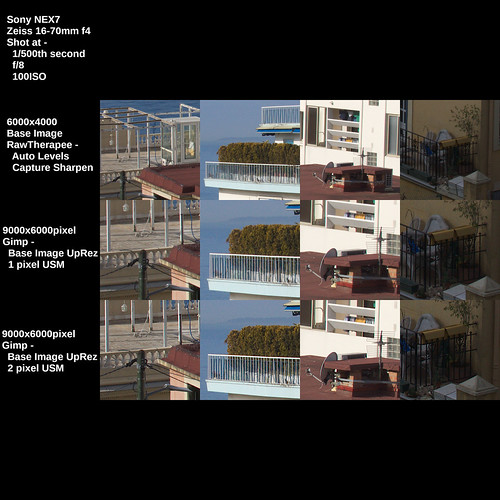
In the following comparison I show the base image as processed in RawTherapee and with "Capture Sharpen" applied.  Then I show the Gimp output of a simple Image -> Scale image from 6000 pixels on the long side to 9000 pixels (a 2x area increase in size) with light USM (unsharp mask) applied in selecting 1 pixel and 2 pixel mask widths.


UpRez'd Single Image ~ "Super Resolution" comparison ~ 2021


As you can see, if you start with a "clean file" (ie: well controlled noise) the USM sharpened output looks pretty good.  This is as good, in fact, as anything I've seen from the new Super Resolution products, because, as I said earlier, those products aren't really bringing anything new to the table.

A last note before we move on.  I've found that the Sony APS-C sensors (even the 10+ year old sensors) out perform Canon's current Full Frame sensors at low ISO.  Canon CR2 raw images have a lot more noise in the shadow areas than Sony AWR raw files.

Further, after working with Canon and Sony raw images for well over a decade, I have the strongest impression that a Sony NEX7 low ISO file up-rez'd from 6000 pixels to 9000 pixels on the long side are cleaner and clearer than a native resolution Canon CR2 file of any file dimension, even with a decent "Capture Sharpen" applied.

Heresy, perhaps?  In my case it seems to be the truth.

Tuesday, March 23, 2021

Check out this guy's stack of glass.

 Old lens inventory.

It seems he has a YouTube channel as well. 

I'll never ever get anything close to what that guy has.


Family Portrait ~ Nikon manual focus lenses
 
A few lenses
Many of these have found new homes 
since I took this photo

Sunday, March 21, 2021

Down another rabbit hole...

Shared with little comment...

Aero Ektar lenses on old cameras (yes, I used to own an Aero Ektar and used it on a Speed Graphic, too, but what a BEAST that setup was)

David Burnett on photography

David Burnett photographing the 2nd impeachment hearings

Eric Lindbloom "Angels at the Arno" is a book that was shot using 120 film in a cheap meniscus lens Diana 

David Hamilton's "Venezia"/"Venice" is a book that was shot in a very soft style

A friend sent links and hints to these and other stuff just yesterday.  After wandering around that side of the photo-universe I felt I had to share them in case you're not already aware (I certainly wasn't - not that I know everything - very far from it, in fact).

The passion for photography is clearly evident to me.  Makes me wish Paris hadn't just re-confined for the third time in a year.  I feel stuck along the cote d'Azur and I don't have access to my "things."  I feel I'd like to continue to explore the use of a lens that I modified.  And I'd like to order a few books, too.

I realize this is a First World Problem and that we're all in the midst of something deadly serious (Covid-19).  Hopefully my wife and I will both have our vaccinations soon.


Peille ~ 2021

Peille ~ Village Perche'
in the Alps above Menton and Monaco

Thursday, March 11, 2021

Image Sharpening ~ in-camera and Capture Sharpen (RawTherapee)

The prior two winters we in Nice I feel I learned quite a bit about out of focus rendition (aka: "bokeh").  I had a small stack of Nikkor and Takumar manual focus lenses that I'd brought with me.  The project was sparked by my wondering how on planet earth the 85mm f/2.2 SF Pentax had apparently such extreme depth of field, even wide open at f/2.2.  My questions were eventually answered and I felt I'd spent my time well during winter "down time" when there wasn't much to do along the cote d'Azur.

This year I changed things up quite a bit.  I left all my manual focus lenses at home and abstained from dragging the gorgeous low-milage A7 full frame with me.  This year I'm going all AF after having learned that manual glass can be quite heavy and the weight limit on baggage can be breeched if one isn't careful when making an emergency return to Paris via aircraft.

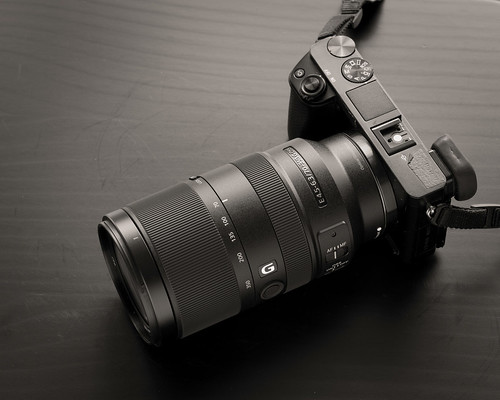
I brought with me two EVF Sony APS-C mirrorless cameras.  One is a NEX7 that a friend sent me and the other is my old A6000.  The A6000 has a 70-350mm f/4.5-6.3 G-Master OSS mounted on it and the NEX7 has mounted on it what turns out to be a very lovely 16-70mm Zeiss ZA f/4 OSS.  The out of focus rendition of the Zeiss lens is to my eyes nothing short of wonderful.  I may have to write something about these two lenses someday, but we'll see.

This has left me with no photography blog project to work on.  The weather is different this year than the last two (colder and wetter).  The pandemic has kept folks locked down (even as they fail to wear masks - is it any wonder that this part of France has blown up "red" on the Covid charts?).  And even though we bought a used car (our first in our nine years of living in Europe), we head out about once a week.  This still leaves a ton of "down time."

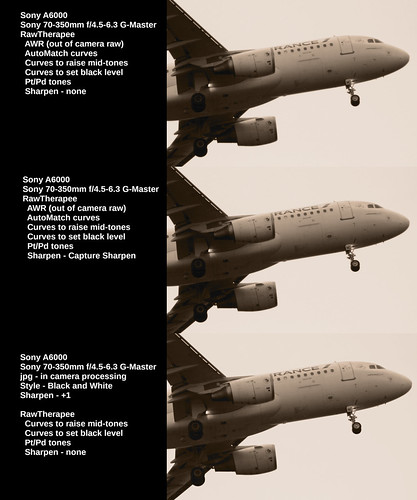
My mind ricochets off this and that idea.  Daydreaming, thinking about this and that, and considering my recent realization that Sony has correctly implemented the human perception model for converting color to black and white, something tickled the 'ol brain cells and I got to wondering how "sharp" in-camera jpgs might be compared with AWR (raw) format images processed with "Capture Sharpen" in RawTherapee. 

This was my first pass.

Image Processing ~ sharpen comparisons
 
Here is the full scene

Image Processing ~ sharpen comparisons

Click on the image and inspect it at 100 resolution

It is pretty easy to see that the AWR image processed using "Capture Sharpen" is "sharper" than the out of the camera jpg with "Sharpness" set to 0.

This led naturally to the question of what might things look like if I took the in-camera jpg processing "Sharpness" up to +1?  Here's what I found.

Image Processing ~ sharpen comparisons

Here is the full scene

Image Processing ~ sharpen comparisons

Click on the image and inspect it at 100 resolution

Comparing AWR/"Capture Sharpen" image with the out of the camera jpg with sharpness set to +1 suddenly became much more difficult. At first I didn't notice any difference. It turns out, differences are rather subtle.

My eyes feel strained.  On very close 100 percent full resolution inspection (ie: staring at the screen for minutes on end) AWR/"Capture Sharpen" _feels_ to me "digital" with hard edges and steep light/dark transitions.  The in-camera jpg processing _feels_ much more like film to me.  There is a nice "roundness" to the sharpened image. 

I will continue to shoot AWR because I like the flexibility in image processing.   If I really want a film like "roundness" to my AWR, I can apply a light unsharp mask or turn down the sharpening parameters of "Capture Sharpen".  

There may be times when in-camera jpg processed images are more than adequate.  If I set the imaging storage to AWR + jpg I would have the best of both worlds, right?  

Which might lead to an interesting new project.  What?  I have no idea.  I seem to have plenty of time on my hands to think about it, though.

Thursday, February 18, 2021

Small sensors and reducing file sizes...

A friend sent me a Sony HX90V 30x point and shoot camera to play around with.  He said there's nothing wrong with carrying a 30x zoom "toy camera" since it fits nicely in a pocket.

The HX90V small sensor has a narrow dynamic range and tends to be rather "noisy", even at low ISO.  These things, compared with the APS-C Sony mirrorless cameras.

Just for grins, I decided to see what would happen if I reduced the file sizes and to see if or where image quality might come close to the APS-C performance.

Here is what I found.

[As always, click on the following image and enlarge it to 100 percent to observe any differences]


Nice 2021


The images down the center of the panel are 100 percent full resolution crops of their respective base images.  The superiority of  the APS-C system in terms of pure image quality is evident.

Looking at the downsized images at 100 percent (the images down the right side of the panel) show things have pretty much "evened out."  The HX90V photos look pretty good.  The only somewhat minor differences being in color rendition.

Which goes to show that a little 30x zoom point and shoot camera is just fine for sharing images across the internet.

And if you don't live or die by side by side comparisons with other systems, with proper care and handling the little HX90V Sony can turn out rather acceptable images, even for up to A3 size prints.

Nice 2021

Sony HX90V image from
a walk around Mont Boron, Nice, France


Wednesday, February 03, 2021

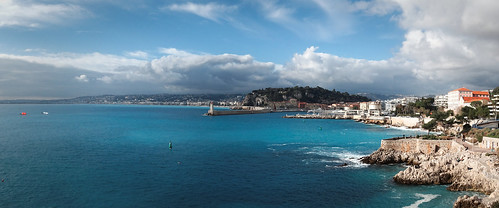
It is nice in Nice...

Yesterday was a glorious day here in Nice.

My wife and I went for a nice walk along the sea.  I had the Sony HX90V with me and shot a few images.


One was a set of images to be used to create a panorama.
 
Just this morning I stitched the image using Hugin.

I think it came out well enough.  It is over 10,000 pixels on the long side and contains a nice amount of detail.  It should print very large with ease.

All this from a little Point and Shoot camera.  You know the type.  It's the kind of camera that very few people carry these days.
 
Yes, I am now officially well behind the curve when it comes to using "new" cameras and lenses and keeping up with the "in" crowd.
 
 
Nice Port ~ 2021

Thursday, January 28, 2021

Don't forget the setup...

This week we tried out a new vehicle we purchased while spending the winter in Nice.  

There's not much photographic to say about the pretty little Prius except she drives like nothing I've ever driven before, and we've already had a Prius when we lived in Portland.  The new version is a Dream Ship.  Nothing I've ever driven is as smooth, quiet, nor as well integrated as this.  She's a "keeper."  It's how we will get around Europe and into the hard to find places.

We have friends who were here in Nice at the same time we were and we'd promised to drive them to Eze to see the jardin exotique that sits at the very top of a huge granite spike.

The only problem was that I'd only driving the Prius once or twice and it'd been at least 9 years since I'd driven on a regular basis.  This would be our first trip out and about, or "off leash", as it were. We decided a reconnaissance trip was in order to get the nerves settled and to check out the "lay of the land."  We did this the day before we were to meet our friends.

Just before reaching the village of Eze from Nice there is a nice scenic turnout.  Turnout we did and I picked up the Sony NEX-7/16-70mm f/4 ZA OSS and made a few images.

When I got home I realized that some of them were slightly soft.  What had I done?  Was the lens OK?  Was something out of alignment?  What photographic madness had befallen me?

After thinking for a few moments and slapping my forehead a couple times to get the neurons firing again I realized that I'd done myself in.


Nice 2021

 This otherwise wonderful image is slightly out of focus.  Ugh.
The old fortress at the top of the hill is the high
point of the
jardin exotique.

After two years of photographing "stuff" using manual focus lenses, I decided I liked choosing my focus point and then to re-frame a scene to take a photo.  In the case of the Zeiss 16-70mm I would set the autofocus in a certain way.  

Early Sony NEX cameras have the nasty habit of focusing on a background, particularly if it is contrastier than a subject/object that is closer to the camera.  It took me a long time to realize what was going on and even longer to find an adequate autofocus "work around."  

My Sony NEX-7 is set up to use the smallest focus point and to activate the back button to perform the autofocus at a very specific point.  I know where I want the point of focus and the camera had to learn to trust me, event if I had to beat it into submission.

What I'd done at the turnout was set the focus the first time, and then forgot to focus just before making other images.  Silly me, I'd gotten out of the "manual focus" back button autofocus habit.  Of course I meant to refocus each time, but I'd simply forgotten to hit the back button focus before hitting the shutter release.

The next day was clear and even more glorious.  Our drive to Eze with our friends was quick and easy.  We visited the jardin and walked around the medieval village.  As I made photographs I forced myself to remember to hit the back button focus before each and every image.

This time when I got home all of my images were properly focused.  Not lens problems.  No pilot errors.  Just plain "goodness."

I really hate making mistakes, particularly after I'd deliberately set the camera up to behave in a specific way.  It's a good thing I don't do this for a living.


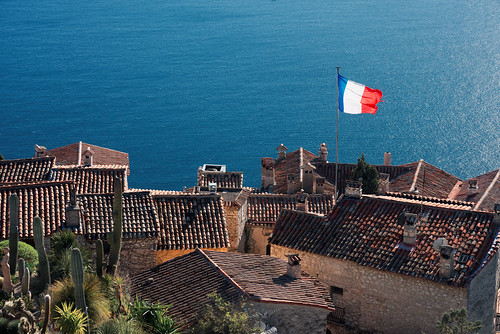
Jardin Exotique ~ Eze 2021

View from the top of the hill.
Here is an album of photos from the trip.


Saturday, January 16, 2021

Ilford ~ making film


It's fun remembering the Old Days.

I used Ilford film and paper for a very long time.  So I find this video rather interesting.

Wednesday, December 16, 2020

Remembering working with film...

My father sent yet another video.  This time it is on Ansel Adams and the Zone System of exposure.


Of course, with digital equipment most of these considerations have been effectively automated.  We seldom consider these kinds of details and certainly not in this specific way.

Watching the video reminded me of two things surrounding the development (LOL!) and use of the Zone System.

First, Phil Davis wrote "Beyond the Zone System" where he helped us understand that film/developer combinations subtly moved the color spectrum up and down the tonal curve.  While not as flexible as performing human perception conversions of digital color to monochrome, I think that anything that leads to a better understanding and control of one's tool set very helpful.

Second is something I find incredibly ironic about Ansel Adam's Zone System.  It involves the history of the development (2x LOL!!) of this system of exposure control.  

One of the photography professors that he taught with at the California School of Fine Arts had suggested this method to Mr. Adams.  This professor apparently picked up on the idea from William Mortensen.  Reviewing the early Camera Craft books that William wrote where he talks about a very specific series of exposure placement and development perhaps you can see what I'm getting at.

If you know the history of Saint Ansel, the Group 64, and their collective hate for William Mortensen, perhaps you will have already guessed at the irony of the Zone System.  I use the word hate because Mr. Adams wrote in a letter that (that was curiously published in his autobiography) he wouldn't be sad if Mr. Mortensen were dead.  

I have no idea what would provoke such a strong response from certain West Coast Photographers, but there you have it.  A little photo-history drama.

Not to make too much out of the whole episode, here's a video on the works of one of Ansel Adams sudents, John Sexton.  

Viewers seldom care about process.  Good photography should speak for itself, right?


Friday, December 11, 2020

Ansel Adams ~ early film

My father sent me another video -


I didn't realize there had been a movie camera there to record the event.  It's pretty interesting to see how they did the climb and to catch a glimpse the stills camera being set up.

Of course this day led to the making of one of the most iconic images Saint Ansel ever made.

By contrast (pun intended?), our current imaging equipment automates nearly everything to perfection.  Who remembers how to balance shutter speed and aperture against the sensitivity of the light gather materials?  Who cares about film/developer combinations and their effects on local contrast?  No, we have it rather easy these days, don't we?

Then, just the other day, I stumbled on an interview with a photographer I've known nothing about.  I thought she has some rather interesting things to say about technologies and their relation to image creation.

How we "see" appears to be linked to the tools we use.


NOTE: if you haven't already seen this, it, too, is quite good, but from a different perspective.

Sunday, November 29, 2020

Black and White photography ~ an unexpected realization

Readers may already be aware of something key to understanding Black and White photography and human vision.  For myself, it has taken a very long time to sort any of this out.  Alas, here I am.  Finally.

It is already well understood that taking a color digital image and de-saturating it creates an all too often uninteresting mess. What occurred to me is that Black and White film, too, could be a complete and utter mess.  It was always a struggle to get something we called "tonal separation" between the grays.

Back in the day I understood how a panchromatic emulsion was different from orthochromatic.  And I thought I understood how filters could be useful when shooting panchromatic film.  But, still, film took years of working with to try and get something "interesting" out of.  As I say this, I'm thinking of all the "special" developer setups (Rodinol at 200:1 dilution instead of 25:1) and process methods ("semi-standing" for 30 to 45 minutes so as to "bring up" shadow details).  What alchemical insanity it all was just to try and get some "tonal separation."

What took me forever to understand is that human perception has something very important to say about how we see color tones in Black and White.  Tim Soret clearly illustrates the importance of understanding and using the principals of human perception in imaging.  With this in mind, what I have come to learn and appreciate is that digital Black and White image quality can _exceed_ that of Black and White film.

Such a shocking realization, this.

On the other hand, I naively thought that digital in-camera Black and White image conversions were simply de-saturated color images.  So I learned how to apply human perception corrections on the computer.

Recently, a friend sent me his wee-Point and Shoot Sony HX90V 30x small sensor plinkey-plinkey camera.  It's kind of a fun camera, what with the long zoom range and all that.  The poor dear delivers only jpgs and I quickly searched for ways to get the best out of the small setup.

Wandering the Paris streets during our second Covid-19 confinement I made an image my friend and I thought was actually pretty nice.  Fortunately, I took two shots.  One in color and the second using Sony's in-camera "Black and White Style" (_not_ the High Contrast nor the Rich Tone conversions).

Straight out of the camera the Black and White "Style" image looks really nice (see the following image).

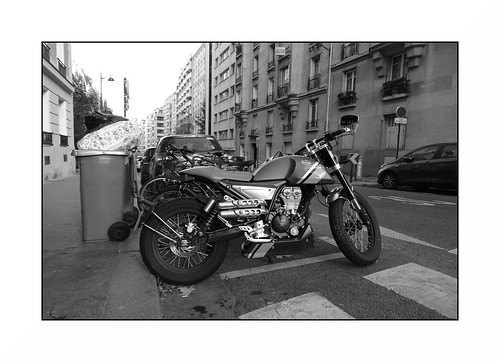
Paris around the edge ~ 2020

To consider what was going on I took the color version of the image and did a human perception conversion on it to compare against the out of the camera version.  Guess what?  They matched.  Perfectly.

Confirming that Sony is, indeed, using the human perception model for their in-camera Black and White "Style" conversions, I took an A7, stacked three different colors with a bit of yellow and re-ran the comparison.  

Note: The human perception model is implemented in the Open Source Software the Gimp as "Lch Color" channel and in RawTherapee as "Luminance." 


Black and White Comparison ~ In-Camera vs Post-Processing


How do Nikon, Canon, Fuji, Olympus, Panasonic, or perhaps rather interestingly Leica with their Black and White only bling-bling in-camera conversions work?  Interested parties should have a look.

For myself I've confirmed that Sony has "hit this one out of the park!"

Here are a few more images nearly straight out of the HX90V plinkey-plinkey - One Two Three Four


Monday, November 23, 2020

A photographer Europeans pay little attention to...

My father sent me another video of Ansel Adams.

As I watched it I realized that Europeans don't hold the West Coast photographers in very high regard.  The possible exception being Edward Weston, but even he is not as celebrated as, say, New York street photographers nor Weston's lover, Tina Modatti.

I grew up knowing about and following the life and works of Ansel Adams.  I went to every show I could, including a fabulous exhibition in LA when I worked in a black and white print lab on Sunset blvd (it was the lab for Samy's Cameras, also on Sunset).  He was a central figure in my photographic awareness.

With time I "moved on" to learning about and appreciating other photographer's works.  People who know me know that I have a great appreciation for what William Mortensen did for photography.  If you don't already understand what I'm saying, check out Mortensen's "Camera Craft" series of guides on model posing, negative and print processes and camera technique.

Coming back to Ansel Adams for a moment, I had an opportunity to buy one of his "Moonrise" prints from his gallery in Yosemite Valley.  I had the $800 in my pocket.  Stupid me, I went and bought a used Leica M3 with a 50mm f/1.5 Summarit lens, instead.  I rue the day I made that decision the way I did.

It is fascinating to watch the following video and to see a young Mr. Sexton working as Ansel's assistant.   Sexton was in Portland once on a lecture and book tour and I got to meet him and learn a bit about his approach to seeing things.

Anyway.  Enough of that.  Here is the video.


Sunday, November 15, 2020

Technologies during times of change...

My father sent me the following video.  

I find it interesting as it illustrates, for me, the deep understanding a person needed of their tools and techniques to make a decent image.

Of course, there is an easy comparison to today's cell phones.  I can imagine current image makers wondering what all the fuss was about.

As a person who made the transition from alchemy, through controlling the materials as carefully as I could, to simply pressing a button, I could ramble on for many beer or wine soaked hours.  But, in truth, it all is of little import.

All that matters is the image.


Saturday, November 07, 2020

Seen on YouTube: Bokeh is overrated

I really like what this guy says and did here.  It is making me stop and think a bit more deeply about out of focus rendition and its importance (or lack there-of) in photography.


Sunday, October 11, 2020

Well, yes, things have changed...

I recently snarked and whinged over obvious changes taking place in the community of image makers.  Not knowing what else to do, bored I guess, I decided to see what was on the market.  Which led to an upheaval of equipment chez moi.

The shift started with the Elinchrom flash kit.  Then, like magic, half of my collection of Nikon Nikkor glass was on offer.  Only to be replaced by a couple things.  

Lots going out.  Just a bit coming in.  Better balance of tools and materials?  Maybe.

Animated Spirits - reborn

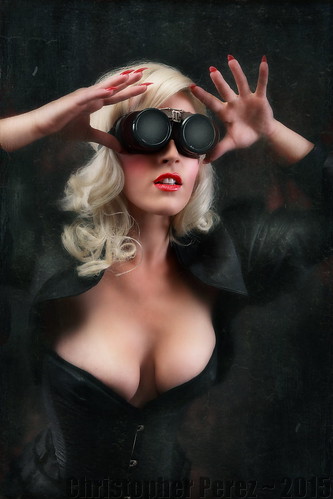
From a photoshoot I had
shortly after moving to Paris
lit using Elinchrom Bx500Ri

The Elinchrom flash system was used perhaps a dozen times.  I'd purchased the materials new in anticipation of working with models in Paris of the kind I enjoyed working with back in Portland, Oregon.  Alas, things are quite different here, I had a big lesson to learn, and I was never able to get anything serious off the ground.

After nearly three years of sitting idle, I sold nearly everything from the studio kit.  I've kept the backdrop system of poles and stands "just in case" something comes up.  I will use available light should any future opportunities to work with creative people arise.

Lens Stories ~ Lens Lineup

A small sample of the collection of
Nikkor lenses that used to take up
space in the closet

With the Nikkors I rationalized the sales by admitting I had way too much glass in the closet.  I had duplicates and sometimes quadruplicates of nearly every focal length from 20mm up through 300mm.  So a bunch of stuff had to go.

Knowing now what I know about out of focus rendition and how nearly all lenses out resolve film and sensors, I decided to keep a few that I've found have unique properties.  The Micro-Nikkors and an interesting 50mm a/1.8 AiS remain in the closet.  So do the incredible 85mm f/1.8 K and early 105mm f/2.5 P.  I'm weighing keeping the surprisingly good 75-150mm Series-E f/3.5 and an old 35mm f/2 pre-Ai as well.

After a few sales the envelope of resources had grown somewhat large and, lo and behold, I can across an inexpensive nearly mint Zeiss 16-70mm ZA OSS f/4 for the Sony APS-C mirrorless cameras.  

Lens Stories ~ 16-70mm Zeiss ZA OSS

Sony NEX-7 with Zeiss 16-70mm f/4 ZA OSS

What a find this has been!  The 18-55mm Sony kit lens only "comes good" around f/8. Looking at the resolution of the 16-70mm Zeiss from wide open proves to me the value of spending a bit of money for something "decent."  

Then I looked at the out of focus rendition and I find I am very pleasantly surprised.  I contrast the Zeiss experience against my long time use of a Canon 24-105mm L f/4.  The Canon lens was hugely expensive and had more than a few short-comings that became obvious with use.  However, the Zeiss optic is so good that it doesn't seem to have any weaknesses. I might have to spend a year or two using it as my daily "beater" lens. 

Thumbing a bit deeper into the envelope revealed even more resources. So, what to do next?  Well, it turns out I want to solve a specific problem that I was having photographing automobiles at the Montlhery Autodrome.  It is a high banked track that dates from the early 20th century and motor-events are held nearly every weekend there.

Vintage Revival Montlhery ~ 2019

Nikon Nikkor 100-300mm f/5.6 AiS ~
a real beast to manually focus, but when
I nail the focus - woohoo!!!

Previously I used a Nikon Nikkor 100-300mm f/5.6 AiS to reach out and show the steepness of the racetrack's incline.  This lens isn't often talked about, but it is one of the finest optics, fixed focal length or zoom, that I've ever encountered in this range.  The out of focus rendition is "to die for" gorgeous.  The resolution is incredible from wide open.  It really is that good.  But, manually focusing that thing at 300mm is a real bear, even when perched on a monopod.

I'm not sure how it happened, but I rediscovered that Sony recently released a 70-350mm G-Master optic for their APS-C system.  A friend has been sharing some images from airshows in England, where he uses a Canon 100-400mm L.  

Lens Stories ~ Sony 70-350mm G-Master

Sony A6000 with Sony 70-350mm f/4.5-6.3 G-Master

At 350mm's on the long end the Sony isn't quite as long a lens as the 100-400mm Canon, but it might be close enough (what's 50mm's, really now).  It has better reviews than the more expensive full frame Sony 70-300mm G-Master.  The out of focus rendition looks nearly the equal of the 100-300mm Nikkor.  For this old man who is getting a little shaky the very best part is that the Sony 70-350mm comes with auto-focus and optical image stabilization.

I'm looking forward to Montlhery re-opening events to the public (we're in the midst of a pandemic just now).  This coming spring at the Vintage Revival I hear that the Beast of Turin will thunder its way around the circuit.  What a sight that will be!  Maybe my wife and I will be able to go across la manche to see our English friends, too, as soon as things open up again.  There are a few of our friend's airshows that I'd like to see what this lens can do.

All this leads me to the current state.  I really should stop buying and selling things, but it's what I do when I'm bored and photo opportunities are few.  

When the situation changes and I can get out more I know I will be able to concentrate on making images and this Madness will pass.

Oh.  Have I mentioned I've taken up drawing?  Hah.  I must really be bored.


Beast of Turin ~ 1911 Fiat S76

Beast of Turin Fiat S76 at Retromobile 2016