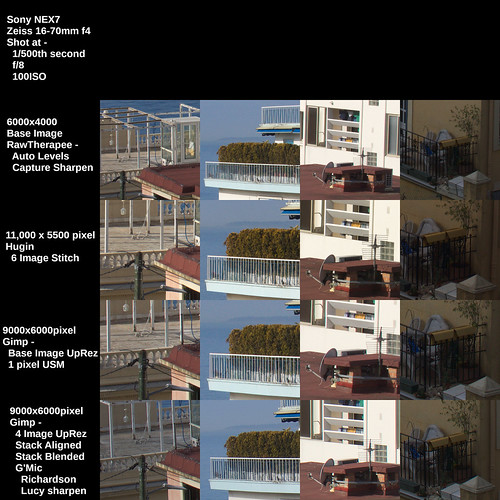
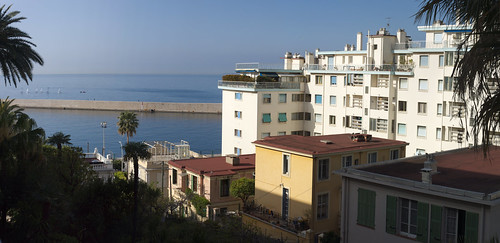
Saturday, June 26, 2021

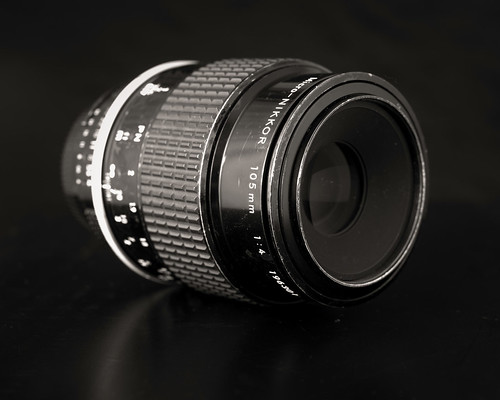
Nikon Micro-Nikkor 105mm f/4 Ai

I had this lens up for sale not too long ago.  No one seemed to want to bite, even though I'd put a rather low price on it.  So I took down the forsale ad on my Nikon Micro-Nikkor 105mm f/4 Ai lens, put it into its case, and put it back on the shelf.  

My wife and I then went on winter holiday, where, for the second year in a row, we got stuck in Nice.


Lens Stories ~ Nikon Micro-Nikkor 105mm f/4 Ai

OK.  Just how "stuck" can one actually be when in Nice?  

Well, we were "locked down" by the French government due to the extreme pandemic conditions in the Alps Maritime (where Nice is located).  All social events, art exhibitions, and concerts were cancelled and banned until further notice.  Travel was limited to 10km from your place of residence.  We couldn't legally return to Paris, even if we wanted to.

Of course, there was the beautiful Mediterranean sun and warm winter weather, right?  Er.  No.  Not this year.  It rained.  And it rained.  And it rained some more.  And it was cold.  There was snow in the hills around Nice well into April.  Nothing was open, though we could get "take-out" from a couple restaurants in the area, including a wonderful "hole in the wall" pizza place.

I know. I'm bitching and moaning about being "locked down" in paradise.

It did give me time to think, though.  One of the things I thought about were my manual focus Nikkor lenses.  I still have too many of them for one man's own good.  I enjoy having them.  I enjoy photographing with them.

When we were finally able to reach Paris again I was delighted to see all my "stuff" and "things."  Just seeing my several boxes of toys made me smile.

I'd taken a look at out of focus rendition in an earlier article.  There wasn't much to say except the Nikon Micro-Nikkor 105mm f/4 Ai didn't look a whole lot different than some of my other lenses.  Resolution is as good as anything else.  It was nice but unremarkable.  I hadn't found must "magic" in the lens.


Lens Stories ~ Nikon Micro-Nikkor 105mm f/4 Ai

After photographing three lenses for other articles found here, I turned the Sony A7 and Nikon Micro-Nikkor f/4 Ai on a pretty little orchid my wife brought home.  When looking at the images I thought "gosh, now don't those look nice?"  The out of focus rendition behind the point of focus was quite unexpectedly smooth and delicate. 

My thoughts on this old "Heliar" design Micro-Nikkor lens needed an evolution in light (ahem!) of those orchid photos.  Then I looked more carefully at the lens portraits I'd taken earlier the same day and thought "well well well then, aren't those just drop dead gorgeous?"

Maybe I'd been a little too hasty in putting this old beat-up lens up forsale?

Next month there will be a couple car gatherings.  One in particular should be an interesting event to try this ugly duckling of a Nikon Micro-Nikkor f/4 Ai.  Hopefully my current more highly evolved thoughts will be soon proven correct.

Yes.  I know.  Like everyone else I've been coupe'd up far too long.  I find myself _wanting_ to love this lens and it gives me pleasure to think I've found where the "magic" lay.

Wednesday, June 23, 2021

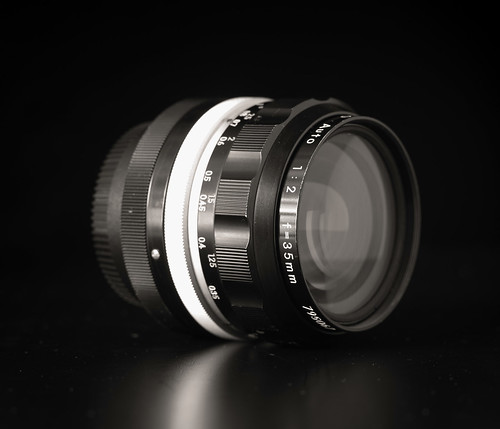
Nikon Nikkor-O 35mm f/2 pre-Ai

In 2016 my wife and I visited le Grand Train, a short-term food court event held in an old SNCF railyard on the north side of Paris.

After my usual whinging and thrashing over what to carry by way of camera I finally settled on one of my Sony NEX-5T, a straight-through adapter, and the Nikon Nikkor 35mm f/2 Ai I had at the time.  On the crop-sensor NEX the full frame equivalent works out to around 52mm's, or what we used to call a "standard" focal length.


Lens Stories ~Nikon Nikkor-O 35mm f/2

Soon after, I sold that lens.  Of course, me being me, I soon regretted the sale.  I'd gotten around 150 bux out of it to help finance the purchase of something else I thought I desperately "needed."  My aging brain can't remember what I bought, but I can still remember that lens.

On the rendition of the images I took that day...  I don't know... there is just "something" about them that appeals to me, even now.  Some of it is the Capture One "gold" somethingorother preset I had access to at the time.  Some of it, I felt, had to be the way the lens renders when shot wide open.

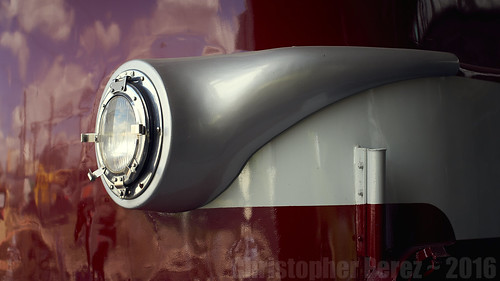
Here are two color image examples from le Grand Train.

le grand train

Artful Headlight
le Grand Train
Nikkor 35mm f/2 Ai

le grand train

 Business End
le Grand Train
Nikkor 35mm f/2 Ai


The lens wasn't "clinically sharp" at f/2, but compared with modern lenses it could certainly "hold it's own."  If I needed "clinically sharp", I could certainly get things to look like anything else in the lens kit with a little "smart sharpen" or "capture sharpen" during processing.  

As a side note, I believe Lightroom and RawTherapee have similar "capture sharpen" functions. This can be applied to a file as a way to offset anti-aliasing sensor filters as well as to offset lens "softness."

A couple years later I was browsing That Auction Site out of boredom. I came across an early Nikkor-O pre-Ai copy.  Patiently I waited for the auction timer to count down.  Patiently I watched as no one bid.  Patiently I hoped I could win.  Patience does not come easy to me.  I did the best I could.  Trying to be virtuous and all that... et...  voila! I sniped it for less than 50 bux, delivered.  When it arrived it was in even better condition than I'd thought from looking at the auction photos.  Happiness ensued.


Grand Corso ~ Carnaval ~ Nice ~ 2020
 
Grand Corso ~ Nice ~ Mardi Gras
2020
"Second Chance" 35mm Nikkor-O
Sony A6000
LensTurbo II focal reducer


This "Second Chance" Nikkor-O, like its Ai series successor, renders beautifully.  Wide open this single coated lens exhibits just a hint of "sparkle" in the highlights that the multi-coated Ai version I had did not.  The out of focus rendition behind the point of focus is Nikon's typical gorgeous smooth under-corrected spherical aberration yumminess that sends me over the moon in delight.

These days the "Second Chance" 35mm f/2 practically lives on a pretty, very low shutter count Sony A7 that I'd also picked up for cheap.  

With the re-opening after a long, difficult pandemic, I'm hopeful there will be plenty of future opportunities to use the combo A7/Nikkor-O.  It'd be fun to come away with a few more good images.


Villefranche sur Mer ~ 2020
 
Villefrance sur Mer
2020
"Second Chance" 35mm Nikkor-O
Sony A6000
LensTurbo II focal reducer

Monday, June 21, 2021

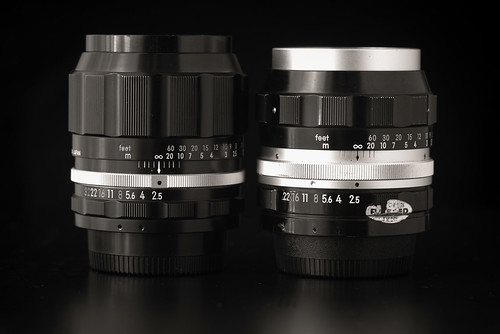
Nikon Nikkor-P 105mm f/2.5 ~ two SLR 1960's/1970's versions

In an earlier post I said "... Not that I needed a third 105mm lens or anything like that, but, apparently I needed a third 105mm lens... It appears that I'm the second owner of a gorgeous version of an updated dual rear element optic..."

Lens Stories ~ Nikon Nikkor-P 105mm f/2.5

The development history of the fabled Nikkor-P 105mm f/2.5 lens is well known.  

I remember reading somewhere that Nikon took their c.1954 10,5cm rangefinder lens, shaved 1mm off the rear element to clear the Nikon F SLR mirror, and introduced that lens in 1966.   

Nikon's own Thousand and One Nights series  documents some of this from a designer perspective.  They say...

"...Compared to the previous model with the [Nikkor-P early SLR] Sonnar type lens construction, [the updated Nikkor-P Xenotar type] offers significant improvements in close-range aberration fluctuation, as well as peripheral light, spherical aberration and coma. In particular, it delivers a beautiful balance of focused and defocused (blurred) images, as well as higher resolution with natural gradation. The Xenotar-type lens design with the ideal aberration correction made it the perfect lens for portraits..."


Lens Stories ~ Nikon Nikkor-P 105mm f/2.5

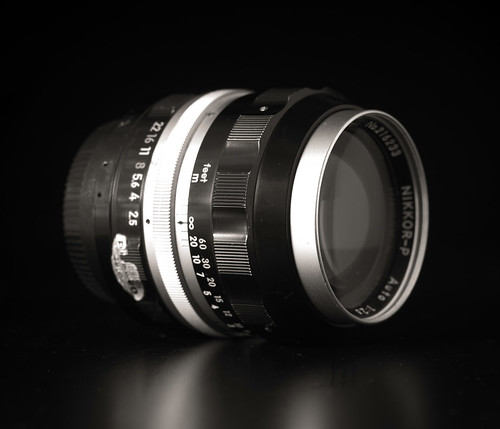
I once again have one of each version of this optic.  The chrome-nose 105mm on the right in the top image is the earlier 105mm SLR single rear element Sonnar design.  The black-nose 105mm lens on the left is the 1970 Xenotar update version.

Of course I couldn't help myself and I had to see if I could see these things.  Additionally, I wanted to see how the two lens designs handle highlight transitions.  So I selected a scene that included white screen door material and an edge of a sliding glass door.  I also "Capture Sharpened" images from both lenses to see how much the software normalizes output resolution. Lastly, I wanted to confirm that in terms of "sharpness" that even 50 year old lenses can still "look good", even by today's hyper-sharp standards.

[click on the following image and enlarge to 100 percent]

Comparison ~ Nikon Nikkor-P 105mm SLR version 1 and 2


Now that you've had a good squint at the output, can you tell any difference between the two?  I can't.  Well, maybe a little.  If I really squint hard, stand on the tippy-toes of my left leg, spin counter-clockwise, and chant "lenses lenses lenses."  Any minor differences are really difficult to see and might quickly be put down to focusing differences, if any.

So what have I proven?  Well, both lens designs seem to render highlights very similarly. Both can be made to appear very sharp.  Both handle shadow details equally well, even though they are single coated.  And I can re-affirm that I like both of these lens versions equally.

This leaves me in something of a conundrum.  Which lens would I carry and why?


Lens Stories ~ Nikon Nikkor-P 105mm f/2.5

Wednesday, June 16, 2021

Old Manual Focus Lenses ~ current collection

I recently downsized my selection of manual focus lenses from an unmanageable to a nearly manageable number of items.  

To celebrate, I thought I'd do yet another "family portrait."


Lens Portrait ~ 2021

Missing from the portrait are two lenses.  One that for some reason didn't make it to the table.  That would be the rather too shy for its own good Nikon Nikkor 50mm f/2 Ai.  It should've gone right next to the pretty little 50mm f/1.8 AiS "pancake" lens at right in the front row.

The second is a lens that arrived a couple days after I took the above photograph.  Not that I needed a third 105mm lens or anything like that, but, apparently I needed a third 105mm lens.  It would've slotted in next to the gorgeous 35mm f/2 on the right and just in front of the early design single rear element Nikkor-P 105mm that is also on the right.

It appears that I'm the second owner of a gorgeous version of an updated dual rear element optic.  It is pre-Ai and, according to the documentation I received, was purchased in late 1973 from a shop here in Paris, France.  There are only a few indications on the focusing ring that the lens is not new.

Along with the lens came two marketing brochures.  They describe Nikkor lenses from the late pre-Ai period as well as from the early Ai time frame.

Here is the scanned pre-Ai lens document.

Here is the scanned early Ai lens document.

When I was young I poured through these two catalogues of lenses.  My imagination was thoroughly fired up by what I saw.  Since I now have these on hand I decided to scan them.  For posterity sake and all that.

You may have noticed that 135mm lenses are missing from the family portrait.  I'll have to wait to see how much longer that remains the case.  I miss the 135mm Ai f/3.5.  I'd sold it in a fit of downsizing.  I think I went too far.

If I'm not careful and before I know it I'm certain to again reach a clearly unmanageable number of manual focus lenses.  

My only justification is that I'm trying my darnedest to limit the budget to well under 50Euro each.  That, and the fact I'm very happy with having found an early Sony A7 24mpixel full frame camera that arrived with less than 800 clicks on the shutter.  It "needs" lenses, right?

Tuesday, June 08, 2021

Sony HX90V vs Motorola G8 Power ~ a quick comparison

Well, that was quick.  

I'm back with yet another article on resolution and such Madness.  This time I compare photographs taken using a Sony HX90V 18mpixel 30x zoom point and shoot against a Motorola G8 Power that I recently picked up on sale.

The setup was a street scene.  The camera and phone were shot handheld.  I selected the focal lengths closest to 24mm full frame equivalent.  On the Moto G8P this meant selecting the middle/default lens, where I set the resolution to 16mpixel.  I let the devices deliver the output jpgs using their default image processing modes.  

That's it.  Easy peasy.

Here is a comparison of images between the two devices.


Motorola G8 Power vs Sony HX90V at approx 24mm FF equiv


As is quickly confirmed, the Motorola fixed focal length lens system outperforms the Sony point and shoot at this focal length.  Images out of the Moto G8P are sharp to the very edges.  The Moto G8P colors are more pleasing to my eyes where the Sony color tones feel slightly "washed out."

Compared to APS-C or Full Frame images, these devices produce somewhat "water colory" rendition.  Yet, when downsized for viewing across the web images from the small devices aren't half bad.

Of course the Moto G8P doesn't have the kind of reach that the 30x zoom Sony HX90V has.  But after spending far too long cooling our Covid 19 pandemic jets in Nice, France this past winter where I used the Sony quite often, I realized yet again that I seldom use long focal lengths when I'm out wandering around.  I just don't "see" that way.

I know I'm well "behind the curve" on this stuff.  So I'll close by saying the obvious - cell phone cameras aren't nearly as bad as I feared.

Monday, May 17, 2021

Soft Focus ~ a consolidated short list of lenses

Here is a short list of soft focus lenses that I recently compiled.  I posted parts of this in several previous articles.  Of course there are many additional options, as can be seen on Jim Galli's old Tonopah site.  So do not take this as a definitive list, OK?

The first section came from browsing the Clarence White edited journal "Pictorial Photography in America" from 1920 thru 1922.  These journals reveal an interesting list of lenses -

  • Aldis f/3 and f/4.5
  • Goerz Portrait Hypar
  • Pinkham and Smith -
    • "Synthetic" for landscape
    • "Visual Quality" for portraiture
    • "Wolf Artistic" slip-on diffusion lens
  • Spencer Portland Pictorial
  • Struss Pictorial
  • Turner Reich Hyperion Diffusion Portrait f/4
  • Wollensak Verito f/4

Post-Pictorialist Era Large Format Soft Focus Optics
  • Cooke PS945 9inch/229mm f/4.5
  • Fuji Fujinon 180mm f/5.6 SF with strainers
  • Fuji Fujinon 250mm f/5.6 SF with strainers
  • Rodenstock Imagon series with strainers
    • 120mm
    • 150mm
    • 170mm
    • 200mm
    • 250mm
    • 300mm
    • 360mm
    • 480mm
  • Yamasaki Congo 150mm f/5.6 SF
  • Yamasaki Congo 200mm f/5.6 SF

120 Medium Format Optics

  • Fuji GX EBC Fujinon GX/GXM SF 190mm f/8 
  • Mamiya 645 Mamiya-Sekor SF C 145mm f/4 
  • Mamiya RB67 150mm f/4 C Variable Soft Focus 
  • Mamiya RZ67 180mm f/4 D/L Variable Soft Focus 
  • Pentax 67 SMC 120mm f/3.5

35mm format glass optics

  • Canon FDn 85mm /f2.8 six elements/four groups
  • Fuji M42 85mm f/4 - four elements/four groups 
  • Kenko 
    • MC 45mm f/4.5 - two elements/one group meniscus 
    • MC 85mm f/2.8 - three elements/three groups
  • Lensbaby 
    • Velvet lens series - 28mm, 56mm, 85mm
  • Minolta 85mm Varisoft f/2.8 - six elements/five groups 
  • Pentax 
    • K-mount 85mm f/2.2 - two elements/one group meniscus
    • SMC F/FA 85/2.8 Soft - five elements/four groups
  • Sima 100mm f/2 Soft Focus - single element(?), no aperture control 
  • Sony A-mount AF 100 F2.8 Soft - eight elements/eight groups
  • Tamron T-mount 70-150 f/2.8 SF type 51A - fourteen elements/ten groups 

35mm format plastic lenses

  • Kiyohara Kogaku 
    • Soft VK50 f/4.5 - single element plastic
    • Soft VK70 f/5 - single element plastic 
  • Lomo Plastic Diana lenses 
  • Yasuhara Momo 100 43mm f/6.4 Soft Focus
 
I think that's it for now.  Maybe a good photography project will keep me occupied after things open up a bit.  
 
Until then I'll likely go rather quiet.  Not much to write.  Not much to share.  Hope enjoyed the stuff that did get posted.

Bye for now.


Lens Stories ~ Pentax 85mm f/2.2 Soft

Saturday, May 15, 2021

Soft Focus ~ Comparing Various Approches

Years ago I shot large format film (4x5inch up to 12x20inch) and I followed Jim Galli's soft focus lens journey. The way he talked about his deep lens mine still cracks me up.  His images from various soft focus lenses piqued my interest and his work became something of an inspiration for me in my own on-again/off-again soft focus lens explorations.

Jim had a wonderfully quirky website which dropped offline for me here in Europe.  Perhaps it's still reachable from the US?  Additionally, I see Jim is no longer part of the Large Format Forum.  I'm not sure what happened.  He'd been on that site for years.

A quick search reminded me that the Way Back Machine archives websites.  Sure enough, they've archived a copy of Jim Galli's site from late 2019.  I'm thrilled.  Now I can go back and look at his work for ideas and understanding of how classic soft focus lenses can function.

Up to this point in my Soft Focus Adventures I have looked at filtration, optically induced softness, and nose oil finger "gunking" a lens or filter.  What I would like to do now is to compare these three approaches side by side by choosing images that I feel best represent the soft focus effect.

Following with a previous format, I would like to first review available optics as I currently understand the market.  Specifically I would like to present a list of 35mm SLR small format soft focus lenses.

35mm format glass optics

  • Canon FDn 85mm /f2.8 six elements/four groups
  • Fuji M42 85mm f/4 - four elements/four groups 
  • Kenko 
    • MC 45mm f/4.5 - two elements/one group meniscus 
    • MC 85mm f/2.8 - three elements/three groups
  • Lensbaby 
    • Velvet lens series - 28mm, 56mm, 85mm
  • Minolta 85mm Varisoft f/2.8 - six elements/five groups 
  • Pentax 
    • K-mount 85mm f/2.2 - two elements/one group meniscus
    • SMC F/FA 85/2.8 Soft - five elements/four groups
  • Sima 100mm f/2 Soft Focus - single element(?), no aperture control 
  • Sony A-mount AF 100 F2.8 Soft - eight elements/eight groups
  • Tamron T-mount 70-150 f/2.8 SF type 51A - fourteen elements/ten groups 

35mm format plastic lenses

  • Kiyohara Kogaku 
    • Soft VK50 f/4.5 - single element plastic
    • Soft VK70 f/5 - single element plastic 
  • Lomo Plastic Diana lenses 
  • Yasuhara Momo 100 43mm f/6.4 Soft Focus

In general I feel the lenses in the above list can be good for re-creating Pictorialist Era images.  The following comparison attempts to share what I mean by this.  I've taken the "best" looking images from four different soft focus approaches and put them side by side for easier review.


Comparison of four different "soft" approaches
 

If you fancy trying your hand at old Pictorialist era images, something from the above list might appeal to you.  And if your experience is anything like mine, it might take a bit of time, patience, and practice to get results that truly please.  Patience seems to be the key in learning the capabilities and limitations of the soft focus practice.

Of the images in the above comparison I find I really like the meniscus lens. I literally stumbled on a configuration that works and see it at "f/2.8" to be pretty nice.  Even at "f/4", this little cheap throw-away lens has some interesting properties to explore.  A downside is it's a little funky to work with as two slim extension tubes are involved in getting the focus range approximately usable.

Just behind the meniscus lens "look", I like the Orton Effect digital softening filter.  This tool is very configurable, and therefore very controllable.  You can set the overlaying Gaussian blur, blend mode, and opacities to just about anything and watch what happens to an image.  In the above example I chose a blend, opacity, blur width that, to my eyes, came somewhat close to duplicating the effects I get from the meniscus lens.

For pure hard-core optical effects, the Pentax 85mm f/2.2 Soft set at f/5.6 is pretty interesting.  I'm not sure if/when/how I will ever come to real terms with the objective.  When I go into the field it feels like a risk to take this lens and be somehow disappointed by the results and to come back with nothing.  So I tend not to work too much with it.  Maybe I should take my own advice and just dive in?

Should you seek some inspiration, check out Eric Lindbloom's "Angels at the Arno."  It is a beautiful book filled with images made using a simple plastic lens (an old Russian Diana, I believe), which might prove the point that wonderful images can be made with just about anything.  

Personally, I'm inspired by the "New Pictorialist" editor Chetworth delGato's Minolta 85mm f/2.8 Varisoft images.  It's too bad those lenses currently cost the moon.  There are many claims these lenses are rare, but I easily see them all over eBay. For a price, of course.

Turning to the David Hamilton/Max Stolzenberg stye images, here is a re-post comparison of soft filters vs nose oil (and Arnica Oil - ick! ack!!).


Soft Image Comparison

It goes without saying that the Nikkor Soft filters have little to no correspondence with Hamilton's nor Stolzenberg's "look."  Similarly, the Arnica Oil is just too much.  This is what I found when trying to work with Vaseline, too.  No matter how lightly and thinly I tried to work with Vaseline or Arnica Oil, the whole plot was always, always, always over-softened and did little more than create a mess.

As with Goldilocks and the Three Bears there seems to be a happy medium.  For me, that is the use of nose oil on a lens or, preferably, a UV Haze filter (to keep the gunk off your pristine glass).  Just take a finger and gently rub the side of your nose and then smear it over the filter (or lens, if you really insist).  It's quick, easy, and looks to mimic rather well the David Hamilton, Max Stolzenberg style.  If you want to soften just the sky/trees, simply touch that part of the filter (or lens, again, if you really insist) that collects light from that part of the scene.  If you don't "get" what I'm saying, one or two practice dabs with an oiled finger will get you pointed in the right direction.

Now, is this the actual technique that David Hamilton and Max Stolzenberg used and use?  I have no way of knowing.  But if it's their effect you're looking for, here is one way of "getting there from here."

As a demonstration of the possibilities of the greasy finger approach, consider an image I accidentally made during the 2016 traversee de Paris summer event for automobiles.  Look at what is going on with the hood area of the Talbot-Lago sportscar.  The Sony 16mm f/2.8 SEL I was using got "dabbed" by my greasy finger shortly after I arrived at la place de la Concorde in Paris.  

I didn't catch the mistake until I was back home and looking at the mysteriously soft images I'd captured.  Inspecting the lens quickly explained what had happened.  To salvage something of the images I took that day with the greased up lens I cranked up the contrast.  The out of the camera RAW are much much softer than this.  Taking that into consideration, have a look at the following image and see how the hood "glows."


Talbot Lago ~ la traversee de Paris estivale 2016

Thursday, May 13, 2021

Soft Focus ~ Soft Filters vs Oiled UV Filter

In prior articles I talked a little about a couple of lenses that might be useful in making soft images.  I've also covered the effects of Nikkor Soft #1, #2 analog and Orton Effect digital filters.

Optical effects the Pentax 85mm f/2.2 and DIY meniscus optics seem to align somewhat closely with lenses of the Pictorialist era.  The Nikkor Soft and to some degree the Orton Effect filters to my eye quickly recreate certain soft imaging styles from the 1970's and 1980's.  These filters and lenses seem to have little relation, however, to what the much more current photographers David Hamilton and Max Stolzenberg did and do to create their soft images.

David Hamilton said something very similar to what is currently found on Max Stolzenberg's website.

"...We can assure you that no filters, neither analog nor digital, have been used to shoot this picture! Just a simple analog 35mm camera, a single manual focus lens and the talent of Max ... as well as the beautiful light of south France created this picture..."

Even from a casual glance it is clear the image has been modified to give softness  in the image Max is talking about.

When I look at a partial list of gear that David Hamilton used, I don't see a single soft focus lens.  Additionally, camera bodies generally don't give the kind of softness we are considering.

  • Minolta SRT-101
  • Minolta SRT-303
  • Rokkor 28mm f/2.0
  • Rokkor 35mm f/1.8
  • Rokkor 55mm f/1.7
  • Rokkor 58mm f/1.4 
  • Rokkor 58mm f/1.2
  • Rokkor 135mm f/2.8
  • Rokkor 80-200 f/4.5
  • Polaroid SX70

It's something of a mystery, then.

When I was younger I avidly followed David Hamilton's work.  He was written up in the photography journals of the day, and one of the recurring topics was just how did Hamilton get those effects?

As I wrote earlier, I feel the first broad approach to generating the sense of softness is to shoot into the light.  This was a classic way of wrapping a subject in a soft glow.  I think this, coupled with three other things, is where David Hamilton started.

One of the three things he did was to push Ektachrome film which modified the color response of the film and increased contrast.  The second was to take advantage of internal reflections off the lenses (sometimes called flare) which cut the contrast range.  This may have conveniently offset the increased contrast introduced by the way the film was developed.  The third thing that I feel came into play in Hamilton's images were the print technologies of the day.  

If you compare the printing of his books against his last advertising campaigns perhaps you will see how his published work transitioned from a warm-tone grainy "look" to a crisper, more neutral tone, "cleaner" style as the technologies he used evolved over the years.  I feel some of the original "charm" was for this reason missing from his last works.

Smaller format film naturally came with a certain level of grain.  It was the clumping of silver halide crystals that produced grain.  I contend that one of the effects of grain is to gently distance a viewer from the image.  It takes a step from "reality" toward "non-reality."  Book and magazine published images 40 years ago added a texture that increased the sense of removal from "reality", too.

It was a lesson I learned very early on.  I had the opportunity to look at two original Edward Weston prints.  One was of his famous nautilus shells, and the other was the even more famous peppers.

What I was looking at bore little resemblance to what I'd seen in publications.  The originals were crisp and clear and had very subtle gray tones and not very deep blacks.  It was like looking at the real things. They "felt" very differently to the images that  had been mass reproduced.  Publication technologies had subtly changed my viewing experience.

Shortly afterward I became a black and white print technician at Samy's Cameras photolab on Sunset Blvd.  I learned that Grain was Good in a final print, just as long as it was sharp from edge to edge.  Prints from 35mm and 120 format negatives all took on a certain "distance" between the viewer and the subject due to their obvious grain.

This is why I feel that between the film grain and print technologies that Dave Hamilton's work from the 1970's and 1980's have the "look" and "feel" that they do.

The second broad approach that David Hamilton took, and one that Max Stolzenberg takes is to deliberately soften an image.  This is where the claim of not using soft focus filters becomes something of a curiosity.

Clearly, sections or portions of David's work take on a "glow" that can only come from _something_.  Max's work seems to have adopted this "glowing" _something_ across a much broader range of work.

Yet, if I take a face value Hamilton's and Stolzenberg's claims that they only had a lens, a camera, film, talent, and did _not_ use any filtration, then how did they get the effects they did and do?

Friends and I used to speculate at great length on the topic.  One friend felt David used Vaseline on his lenses.  So we tried it and what a mess!  That couldn't be it.  Another friend heard that he left his lenses uncapped and let dust and dirt accumulate on them over the years.  But that couldn't be it, either, as parts of David's work could be sharp while skies and trees in certain images were softened.  Dirt and grime would lay themselves evenly across a lens surface, wouldn't it?

And so the debate went.  We never were able to come up with a satisfactory explanation.

I thought about all of these things when I came up with the following Late Pandemic Oh I'm So Terribly Bored comparison.  I re-shot a scene using, again, the Nikon Nikkor Soft filters.  Then I shot the scene with an Arnica Oiled-up UV filter.   After cleaning the UV Filter I took my forefinger and transferred a bit of along the side of the nose grease to the filter.  Here are the results.


Soft Image Comparison


This time using a Nikon Nikkor-O 35mm f/2 pre-Ai single coated lens and shooting it wide open, I see that without any filtration or other image modifications that the subject is very sharp and that the background dissolves into a glorious softness.  This, I feel, is a good demonstration of what David Hamilton did by shooting into the light, coupled with the lenses of his time.  Yes, I know he used different subject matter, but you get the point.  I hope.

The Nikkor Soft filters lower contrast and softens the entire scene.  I don't find any resemblance between these filtered images and what David and Max create.

Looking at the Arnica Oiled-up UV filter I see exactly the kind of mess that I got 40 years ago with Vaseline.  Even when applied very very thinly, Vaseline and Arnica Oil produce nothing but a mess.  The image is messy.  The filter is messy.  I doubt very much that this is what David and Max use.  Who would want to contend with such a mess?

Lastly, looking at the UV filter dabbed and streaked with side of the nose grease I feel we're finally getting somewhere.  Compare my image with the two photographers images and I think you'll see what I'm pointing to.

A long time ago I learned that human nose greases were the finest oils found in nature.  They are thin and for photographic purposes easy to control.  Nose oils don't have the messy problem that Vaseline and Arnica Oil do, and nose oil is fairly easy to clean off a lens or filter with a bit of eye glass cleaner.

You can apply nose grease where you want, quickly, accurately, and you have a nearly unlimited, and perhaps the best part is it is entirely free zero cost supply of the stuff.  And what noise grease does to subject shot into the light with a wide aperture lens is something quite magical.

Could it be that the "talent" of Max Stolzenberg and David Hamilton is in the carefully strategic placement of a nose oiled finger on the lens?

I'll leave you with this.  Not wanting to mess a perfectly decent optic, I nose oiled a UV Filter.  Take a look at the following and let me know what you think.
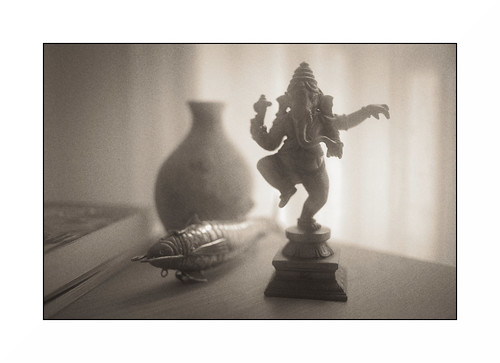
 

Ganesh ~ example 1

Tuesday, May 11, 2021

Soft Focus ~ a little meniscus lens

I would like to recount a short tale of stumbling on a potentially interesting soft focus lens solution.  Before I tell the story, however, it might good to show a list of old lenses in this style, to set the foundation for all this Soft Focus Madness, as it were.

In the 19th and into the 20th centuries lenses made for Pictorialists were on offer.  Many of these were designed with soft image qualities when shot wide open and to sharpen things up as the aperture was stopped down.  

Browsing the Clarence White edited journal "Pictorial Photography in America" from 1920 thru 1922 reveals an interesting list of options (take a look toward the back of the journals in the advertising section) -

  • Aldis f/3 and f/4.5
  • Goerz Portrait Hypar
  • Pinkham and Smith -
    • "Synthetic" for landscape
    • "Visual Quality" for portraiture
    • "Wolf Artistic" slip-on diffusion lens
  • Spencer Portland Pictorial
  • Struss Pictorial
  • Turner Reich Hyperion Diffusion Portrait f/4
  • Wollensak Verito f/4

Even after the fall from grace of the Pictorialist style, lens manufactures continued to design and sell soft focus lenses.  I suspect they were made primarily for the Japanese market, but I have no definitive evidence of this.  

Here is a list of some of the post-Pictorialist soft focus lenses that were available for large format film systems.  Many came mounted in modern shutters such as Copal and Compur rendering them thoroughly usable for modern film photography.

  • Cooke PS945 9inch/229mm f/4.5
  • Fuji Fujinon 180mm f/5.6 SF with strainers
  • Fuji Fujinon 250mm f/5.6 SF with strainers
  • Rodenstock Imagon series with strainers
    • 120mm
    • 150mm
    • 170mm
    • 200mm
    • 250mm
    • 300mm
    • 360mm
    • 480mm
  • Yamasaki Congo 150mm f/5.6 SF
  • Yamasaki Congo 200mm f/5.6 SF

In medium format film post-Pictorialist era soft focus lenses minimally we have -

  • Fuji GX EBC Fujinon GX/GXM SF 190mm f/8 
  • Mamiya 645 Mamiya-Sekor SF C 145mm f/4 
  • Mamiya RB67 150mm f/4 C Variable Soft Focus 
  • Mamiya RZ67 180mm f/4 D/L Variable Soft Focus 
  • Pentax 67 SMC 120mm f/3.5

Interesting Note: I know I wrote this in a prior article, but it bears repeating verbatim.  In their guidance literature Kodak suggests pulling the focus on the subject to objects closest to the camera.  Kodak said there was no useful information produced by their Portrait lenses on things in front of the point of focus.  They suggest, too, letting the under-corrected spherical aberration and deep depth of field that comes with it keep things apparently in focus behind the nearest point focused on.  This is something to keep in mind when shooting any under-corrected spherical aberration behind the point of focus lens.

Since I no longer shoot film and have moved completely to digital with small sensors I've been interested in exploring what might be available for smaller formats.  In a prior article I wrote about the Pentax 85mm f/2.2 Soft.  It was designed and built to give an enormous amount of under-corrected spherical aberration behind the point of focus.

For me, working with the Pentax lens a little difficult.  I haven't found many subjects nor lighting situations that react well to the Pentax' over the top level of softness.  I looked for a less dramatic solution.

Before I could spend more money on exploring some of the old manual focus 35mm SLR soft focus option, a thought occurred to me that I could attempt to follow Jim Galli's example and disassemble a few lenses and try different lens element combinations.

Jim is well known in America's large format film community for his work with soft focus lenses.  Until very recently he had a website filled with images that illustrated soft focus optical effects from Pictorialist Era lenses.  And he didn't stop there.  One of the last posts I read of his talked about how he disassembled an old Schneider Symmar and used one of the lens elements to make photos.  The results were compelling.  Unfortunately his website appears to be off-line.  I can't reach it any longer from Europe.

Digging through my own box full of cast-off, cast-away lenses I choose a classic Plasmat design 6 element 4 group 50mm lens.  These are as common as dirt.  Everyone who was anyone manufactured their own versions of the original "Nifty-Fifty" (as Current Cool Cats like to refer to them as) for perhaps every 35mm SLR ever made.

Just to see what might happen, I firmly grasped the poor old lens and unscrewed the front element set, fettled a correct distance to the sensor plane by adding a few short extension tubes, adapted it to a Sony A7, et voila! a behind the aperture three element two group "meniscus lens."  And it works!!  Have a look.


Nikon Nikkor 85mm f/1.8, Meniscus approx 60mm Soft Comparison


Classic Pictorialist lens image properties are clearly on display.  Images are soft around subject/object edges wide open.  There is increasing sharpness across the scene as the aperture is stopped down.  Using the aperture in this way I can control the amount of overall softness of an image.  

To me, this lens begins to strike a decent balance between the level of softness the lens adds and underlying image sharpness.  I find it crazy that I was able to hit upon this solution straight away at my first attempt.  It was almost too easy.  

Instantly, there is another viable optic for being able to re-create the early Pictorialist image qualities using more current small format tools.

Sunday, May 09, 2021

Soft Focus ~ Pentax 85mm f/2.2 in Nikon F-mount

Previously I had a quick look at how soft focus filters effect an image, and now it's time I had a comparative look at optical softening effects.

In the 19th and into the 20th centuries lenses made for Pictorialists were on offer.  Many of these had distinctly soft image qualities when shot wide open.  Browsing the Clarence White edited journal "Pictorial Photography in America" from 1920 thru 1922 reveals an interesting list of options, including -

  • Aldis f/3 and f/4.5
  • Goerz Portrait Hypar
  • Pinkham and Smith -
    • "Synthetic" for landscape
    • "Visual Quality" for portraiture
    • "Wolf Artistic" slip-on diffusion lens
  • Spencer Portland Pictorial
  • Struss Pictorial
  • Turner Reich Hyperion Diffusion Portrait f/4
  • Wollensak Verito f/4

There were, of course, other "Pictorialist" lenses manufactured over the years, including the color corrected Kodak Portrait lens series. 

Interesting Note: In their guidance literature Kodak suggests pulling the focus on the subject to objects closest to the camera.  Kodak said there was no useful information produced by their Portrait lenses on things in front of the point of focus.  They suggest, too, letting the under-corrected spherical aberration and deep depth of field that comes with it keep things apparently in focus behind the nearest point focused on.  This is something to keep in mind when shooting any under-corrected spherical aberration behind the point of focus lens.

More recently, small camera manufacturers have sold various "soft focus" lenses.  I have a Pentax 85mm f/2.2 Soft in a Nikon F-mount.  It's the only one I've ever seen configured this way.  All the other f/2.2 Soft lenses I've seen come in Pentax' K-mount.  In any event, this is the lens I would like to consider here.

The Pentax 85mm f/2.2 is a two element in front of the aperture meniscus lens.  From prior use I know how strong the under-corrected spherical aberration is behind the point of focus from f/2.2 through to f/4.  The effect is so strong that it is easily seen even on a rather small LC display.

Until I talked with a friend, I thought the super-strong softness of the Pentax was "just the way things were."  He pointed out that at f/5.6 Pentax Soft images just started to "look good."  His own work is much more subtle than mine has been up to now.  He doesn't shoot for softness, he shoots to get the highlights to "glow", which is a rather different thing.  The more of his images I see, the more I'm convinced his approach may be one of the best uses of soft focus lenses of any vintage and of any format, from large film to small APS-C digital sensors.

This led me to consider how the Pentax 85mm f/2.2 behaved down its aperture range.  The following comparison shows the Nikon Nikkor 85mm f/1.8 K shot into the light wide open at f/1.8.  Then I show the Pentax 85mm f/2.2 at each of its marked apertures.


Nikon Nikkor 85mm f/1.8, Pentax 85mm f/2.2 Soft Comparison


As we can see, at f/2.2 the intense softness of the Pentax lens just about knocks you over.  F/2.8 isn't much different.  The level of softness is still very high.  I'm not aware of a Pictorialist era optic that produced this much under-corrected spherical aberration behind the point of focus, though I've seen images taken with Wollensak Verito lenses shot wide open where the softness is somewhat intense.

By f/5.6 the Pentax 35mm SLR lens is, indeed, "just starting" to look like my friends preferred rendition.  The highlights start to "glow" while the underlying image begins to sharpen up.  In fact, it has something of the Nikkor #2 Soft filter image effect in the highlights, except that the Pentax optics are still doing things to the edges of objects that filters would never do.

One of the other curious things about the lens is that it only stops down to f/5.6.  It goes no further.  So I am tempted to make a couple Waterhouse-like aperture disks to lay against the Pentax' aperture blades to see how the lens performs at f/8 and f/11.  It could be an interesting experiment to see if I can get the corners to clean up a bit more while retaining the highlight "glow" that seems on promise.

Saturday, May 08, 2021

Soft Focus ~ filters and software

I'm used to being able to evaluate optical performance based on the number of lines per mm something resolves in a 6:1 contrast ratio scene (ie: how "sharp" a lens is).  I'm also used to being able to think about optical contrast performance based on reading Modulation Transfer Functions (ie: how much contrast a lens can pass through to the light sensitive material).  I think we're all pretty good at understanding chromatic aberration, field curvature, and such things.  

Out of focus rendition is a topic that gets, for me, a little subjective.  Though many people talk about "bokeh" and seem to understand each other pretty well.  But by the time we get to talking about Soft Focus lenses and filter, I think we find ourselves firmly into subjective terminology territory.

How do we talk about Soft Focus photography? As several friends have pointed out over the years, we really don't have a language for talking about nor evaluating image "softness." 

Part of the problem, I feel, has to do with history and the influence of certain West Coast photographers and American critics on the global conversation of what is and is not acceptable photography.  For whatever reasons, after passing through a period of Pictorialism it was collectively agreed that "sharp" is correct and everything else (soft focus lenses, filters, and image manipulations) is not.

Technically, part of the problem is image viewing size changes what we as viewers might find "pleasing."  It seems that too large a viewing size can soften a scene up to and beyond the limits of "pleasing."  Yet, a smaller viewing size of the same image can be found to be "pleasing."  Whatever the squishy, subjective, and imprecise word "pleasing" means.

I've thought about these things off and on for years.  In our current late-pandemic time I've taken up once again a quest to learn a bit more about soft focus images and how they are made.  Yes, Good Sir Knight, it may be a Worthy Quest.  Or not.  I'll see how things turn out after a few more articles on the subject.

I will start by considering something I felt would be obvious.  Filters, both analog and digital.  Filters are an inexpensive and easy way of modifying a scene when using just about any lens.

If you like and study his images, there are three things that come into play that contribute to Hamilton's signature style "softness."  Shooting against the light is one such thing.  We can see this from his earliest publications.  Along with at least one image manipulation (which we will consider in a future article) Max Stolzenberg  nearly exclusively shooting against the light.  If we look back to the earlier Pictorialists, they too used to sometimes shoot against the light.

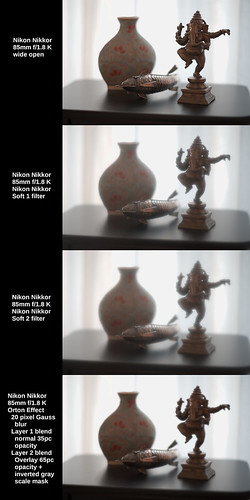
Following their example I chose a scene that deliberately shoots against the light.  No reflected fill is added and the foreground objects are "wrapped" in delicate light.  The exposure is +1ev in an attempt to capture shadow detail against a very bright background scrim.

Technically, the following image comparison used a Sony A7 and a Nikon Nikkor 85mm f/1.8 K.  I photographed the scene without and with filtration.  The filters were a Nikkor #1 and a Nikkor #2 Soft.  Then I illustrate the use of a digital filter and it's effect on the unfiltered starting image.  The digital technique is called the "Orton Effect."


Nikon Nikkor 85mm f/1.8 K Soft Comparison

Thoughts -

 Wide open, the Nikon Nikkor 85mm f/1.8 H, HC, and K lenses (seemingly all versions have the very same optical implementation) are brilliant for the way they sharp from wide open and give a subtly beautiful under-correct for spherical aberration behind the point of focus.  I really enjoy working with this lens.

The Nikon Nikkor Soft #1 and #2 filters give a distinctive 1970's "look" to the scene.  Images are generally soft all over and highlights can glow.  With few exceptions, I don't yet see a compelling correspondence between filtration and early Pictorialist works.  This makes sense to me as Pictorialists used specially designed optics to achieve their unique style of "softness" and I haven't read where they used filtration to achieve the effects they did.  

Compared with what we see from David Hamilton's work neither can I see where there is a good correspondence between his image "look" and filtration.  Compared with Max Stolzenberg's work, the #2 Nikkor Soft comes closest to achieving Max's "style", but to my eyes it is not an exact match.

Considering the "Orton Effect" digital softening approach I don't see a strong correlation between the digital filter and the images of David Hamilton nor Max Stolzenberg.  However, I see where a careful crafts-person could begin to emulate some of the Pictorialist era "styles."  Of course this approach wasn't available to Pictorialists, but the potential to digitally recreate the "feeling" of the earlier era could be there. 

In the next article I will begin to consider Pictorialist style optical "softness" in image making.


Wednesday, May 05, 2021

Soft Focus ~ down yet another rabbit hole

The past year of confinements, restricted movement, and closures of nearly everything I enjoy (museums, motor events, restaurants, cafes, gardens, visits with friends, travel outside the country, etc) has given me far too much time to ponder various photography topics.  I would much rather be out making images, but for obvious pandemic reasons this clearly is not possible.

For seemingly ever I've been interested in camera system resolution.  From large format optics to current small format optics.  I've looked at hundreds and hundreds of systems.  I've spent years and years poking and prodding at this to finally understand that, in general, light sensitive materials (analog film, digital sensors) limit resolution.  With very few exceptions I've not met a "bad" lens that couldn't out-resolve the light sensitive materials.

Then, just a couple years ago I had a look at the transition from in focus to out of focus.  This was really quite interesting.  I learned that the best lens designers work hard to implement lenses that are "pleasing" in just this one narrow area of lens design.  Which led to my learning about how under-corrected spherical aberrations behind the point of focus helps create a softness and delicateness in an image that is highly regarded, particulary in Japan.

From there it was a very short jump to briefly looking at soft focus lenses.  The Pentax 85mm f/2.2 Soft was a somewhat strange lens to me.  Along with the obvious optical properies of "softness", the Pentax Soft has curiously deep depth of field, even shot wide open.  It turns out that this is one of the side effects of lenses designed with a large amount of under-corrected spherical aberrations behind the point of focus.

The Pentax Soft seems to fly in the face of current lens design.  Today it seems that photography is nothing if not needle sharp in rendition.  Yet, there used to be a significant movement in photography that accepted and included images made with soft focus lenses.  Pictorialist photographers turned out some very fine work from the late 19th to well into the 20th centuries.  I enjoy looking at images that span time from Clarence White to William Mortensen.

Thinking of this kind of photography I recalled the soft works of David Hamilton.  His images had an important presence in southern California where I lived during the 1970's and 1980's.  He seemed to use several different techniques for creating his images.  While trying to work out his various techniques I was led to a current day photographer by the name of Max Stolzenberg.

Max makes the claim that "... We can assure you that no filters, neither analog nor digital, have been used to shoot this picture! ..."  Even at a glance the image he refers to appears to be modified from what one would expect out of a camera system, regardless of date of manufacture.

If I take Max at his word, I am immediately presented a mystery.  How does he get his soft effect if he doesn't use a filter?  And, by extension, how did David Hamilton get the soft effects he did?

This series of "Soft Focus ~ ..." articles will explore some of the possibilities for how soft focus image can be created.  With luck I may come closer to technically understanding how to recreate the styles of David Hamilton, Clarence White, and perhaps even Max Stolzenberg.

Paris ~ Fall 2020

Monday, May 03, 2021

Knowledge Test ~ Good Luck!

I thought it'd be fun to see if anyone can figure this out.  It's a game of sorts.  Which lens took which photo?

Have a look at this and tell me what you see and what you think.  The images on the right are of the entire scene downsized to 1500 pixels.  The images on the left are 100 percent crops of the fish in the images on the right.  
It won't matter in this test, but I used a very low mileage Sony A7 (first generation) camera with the ISO set to 64, and strapped it to a very sturdy tripod.


Brain Twister ~ Mystery Lens Comparison


I deliberately chose two lenses of the same focal length and which showed differences in image rendition under test.

To help things along, I'll give a few hints. 

The setup was chosen pointing toward bright, soft light so as to express a full range of tones with plenty of detail in the shadows and specular highlights bouncing off unpolished metal.

One lens was designed in the very early 1960's and the other lens is quite current.  Both derive from the same base optical layout.   

One lens is single coated and the other is multi-coated.

One has a tiny bit of fungus around the very outer edges of the forward element and the other is clean and clear.  

Both RAW images were exposed and processed with exactly the same parameters on a Linux system using RawTherapee.  

Lastly, one lens was designed with over-corrected spherical aberration behind the point of focus and the other was designed with under-corrected spherical aberration behind the point of focus.

NOTE: I think this illustrates that the optical layout (ie: Tessar, Planar, etc) has little to do with rendition.  It's the math used on each and every surface in any design that determines the curve/shape of the lens that matters. 

Still, this is difficult, isn't it?

I've looked at the two images for quite awhile and know where the obvious differences are.  Of course knowing the answers helps me know where to look.

Yet this raises, for me, one simple question: Are the differences important enough to choose one lens over the other?

Last thing: If you correctly tell me just one lens, I'll buy you a couple beers at my favorite pub after the 19th of May, 2021 when things start to re-open here in Paris.

Saturday, April 24, 2021

Orthographic film emulation ~ a real world scene

As I said at the start of the prior post, someone who's work I'm following and who's PhD thesis on pictorialist lenses I've closely read posted something that captured my attention.  I find this and other images of his very charming. As you can see from the EXIF it is an image made using an old single coated lens Zeiss Ikonta B film camera using Orthographic film.

As background information, Ortho film is very sensitive to blue light, minimal sensitivity to green, and zero sensitivity to red.  This was the way _all_ black and white images were before the invention of panchromatic film.  Panchromatic film is sensitive somewhat equally to all visible colors in the spectrum.  It was invented in the early part of the 20th century and is still commonly available.  On the other hand, Orthographic film tends to be difficult to find today.

After creating a digital emulation of Ortho I wanted to see how it behaved in the "real world."

Keep in mind that this is just one image.  To really "know" and understand something takes a bit of effort and many questions will not be answered in a single photograph.  However, I found the following example to be interesting.

The approach I used was to set the exposure/contrast/vignetting levels where I wanted.  Then I moved the mid-section of "Curves" up the range to lift the mid-tones and to ever so slightly flatten the highlights.  I will explain this further in a moment.

NOTE: I learned several things from a series of articles that Mike Johnson has posted over the years about converting digital color to black and white.  In digital conversions to Black and White -

  • Expose for the highlights and process for the shadows - this is the exact opposite of what you do in film photography.  In fact, digital conversions, what with modern sensors and all that, tend to show more detail in the shadows than in traditional film.
  • Luminance - Remember that the human eye perceives same energy colors differently.  For instance, we see blue darker than we see same energy green.  This is how, in black and white photography, we can begin to see what photographers call "tonal separation."  It used to be that "tonal separation" was the Holy Grail of great B&W photography and it was very difficult to control.  This isn't surprising as a simple desaturation without taking into account how the human eye sees colors can produce a Muddy Mess.  I have taken to using luminance, unless I'm working to achieve a specific "look", such as what I'm trying to illustrate with this Ortho film emulation.  With regards to "looks", a good digital B&W conversion can "look better" than film.  I know, more heresy.
  • Lift the mid-tones - I use "curves" to pull up the mid-tones and to slightly flatten the highlights.  This is, actually, one of the "secrets to success" for converting digital color to Black and White.  Why?  Because in B&W photography we printed our negatives to paper.  Paper, it turns out, lifted the mid-tones.  If paper did not lift the mid-tones, we would have had a world filled with Muddy Messes of non-luminescent grays.  Try it sometime.  Take a digital color image and convert it to B&W.  Then gently lift the mid-tones and watch what happens.  If the image is too bright, bring the "lightness" down Do not use "exposure" to do this.  "Lightness" preserves the highlights regions where "exposure" brings the entire exposure range down the curve.  Or take an old B&W negative and scan/photograph it and invert the values.  You will see the Muddy Mess I'm talking about. And then lift the mid-tones using "curves", et voila!  Immediately you will recognize print tone values.  It's magic.  Trust me on this.


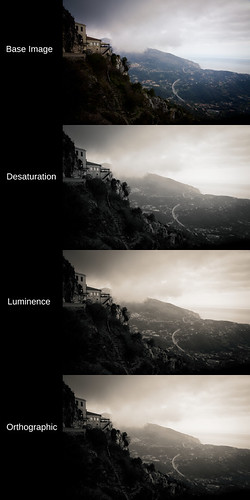
Black and White digital image conversion comparison


As you can see this scene from a viewpoint at Sainte Agnes, France has muted, mixed colors.  The buildings and foreground vegetation are warm in tone.  The sky and horizon are blue.

Looking at the simple desaturate method output and comparing it with the human perception model (luminance) conversion shows what we might expect from modern black and white film as well as de-saturation converted digital color images.  The desaturate image is nothing to write home about.  The luminance conversion shows better tonal separation.

Considering the Ortho image, we can clearly see where the blue portions of the scene are lighter than in the other two conversions.  Overall, it looks as if there is more moisture in the air.  It begins to have that Orthographic film "look."

If you want to fully emulate the old Ortho film look, study where early photographers placed the exposure value and emulate that.  It can be an interesting exercise.

Wednesday, April 21, 2021

Orthographic film emulation ~ Black and White photography

Someone who's work I'm following and who's PhD thesis on pictorialist lenses I've closely read posted something that captured my attention.  I find it very charming. As you can see from the EXIF it is an image made using an old single coated lens Zeiss Ikonta B film camera using Orthographic film.

Ortho film is very sensitive to blue light, minimal sensitivity to green, and zero sensitivity to red.  It can produce a distinctive "look."  In fact, this was the way all black and white images were before the invention of panchromatic film that was sensitive somewhat equally to all visible colors in the spectrum in the early part of the 20th century.

Working in digital and using color channels we can emulate Orthographic film.  The recipe is very simple.  Set the color channels in your processing software's Black and White conversion module as follows.

  • Blue - 100
  • Green - 33
  • Red - 0

Simple as that.

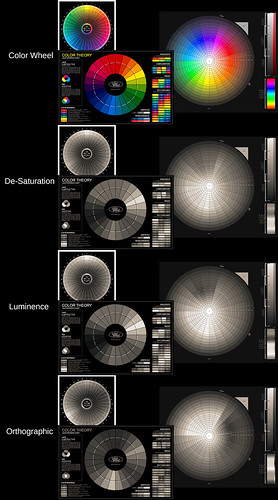
In the following example we can see the original color wheels in color.  This is followed by the color wheels de-saturated.  This method is what I thought digital cameras used to generate/process in-camera black and white images.  Afterall, it's how panchromatic film (more or less) works.

Happily Sony proved me very wrong on this point.  But it is the only method available to Leica in their black and white only cameras.  In this sense Leica black and white images are no better than using old panchromatic film.

After that comes the human perception model luminance color conversion.  Remember that the human eye perceives same energy colors differently.  We see blue darker than we see same energy green.  This is how, in black and white photography, we can begin to see what photographers call "tonal separation."

As I said, Sony's in-camera black and white images don't simply desaturate a scene.  They use, instead, this human perception model conversion.  It's brilliant, actually.  Tonal separation in-camera.  Now who would've thought?  :-)

Finally, we will see how the Orthographic film emulation effects the outcome of the color wheel conversion.  Pay close attention to the visual intensities between colors.  Things change pretty obviously compared with the prior two black and white conversion methods.  Using this approach, perhaps we can begin to emulate the "look" of pre-panchromatic film images?  Let's have a look, shall we?


Black and White Conversion Comparison


Coming back to my friends work for a moment, is what makes his images charming the old Zeiss Ikonta B camera and its uncoated lens?  

Is it the Ilford Orthographic film that he uses that makes his images so wonderful?  

Perhaps, is it the processing chemicals that he's using and the subtle grain his images have?  

Is it a combination of these things, or something else entirely?

Monday, April 19, 2021

Super Resolution ~ Comparing the three methods [part 4/4]

In this blog entry I would like to do the glaringly obvious and compare sided by side the results of the three different methods I tried for creating "super resolution" images.

The three methods are Cubic Up-Rez with USM, Image Stacking, and Image Stitching methods. 

This started after reading articles on Photoshops "new" function that up-rez's an image.  This, of course, comes on the heels of Topaz AI somethingorother "super resolution" product.  The "super resolution" technique has even been applied to cell phone images.


REMINDER: Increasing image sizes using "super resolution" software products does not add information.  If data isn't in the original file to begin with, it will not be added by increasing the dimensions of the image.  This is potentially important as some software providers imply that Artificial Intelligence (AI) is being used to improve an image in ways that were not previously possible.  This is a demonstrably false implication.  Don't fall for it.


One last time, here is the base scene that I will work from.

Base Image ~ "Super Resolution" comparison ~ 2021


In the following comparison I show the base image as processed in RawTherapee and with "Capture Sharpen" applied.  Then I selected what I felt were the best representations, best results of the Cubic Up-Rez, Image Stacking, and Image Stitching methods.


Best Output of 3 methods ~ "Super Resolution" comparison ~ 2021


I ordered the "super resolution" results in order of preference, from best to worst.

Let's start with the worst method.  Or, in the very least, the most difficult method to manage, and that is the image stacking technique.  I've tried this method many times and I fail to see how information is added to the final up-rez'd output.

It sure seems to do a great job on smoothing out the noise, however, but I struggle to see where details to a scene are actually increased. So I'm left wondering what I've done wrong, or what I've not been careful enough about?  This approach certainly works in the Olympus and Sony products (I think Pentax offers this, too, on some of their products).

Given the poor results, I've decided that if I really really need to increase image size and if I only have one image, then the next method is the way to go.

Using the Cubic interpolation coupled with USM light/careful/undramatic sharpening to increase image size can be rather good.  

There's an important secret and this is to set the interpolation sample rate at least 2x higher than the native image dpi.  Many software set the native file resolution to 300dpi.  Therefore, when using the Cubic interpolation method, set the sample rate to at least 600dpi.  I like 1200dpi when using the Gimp.

If you are not using the Gimp to process your images (and most people do not use this Open Source Software) you will need to confirm that the interpolation filter is actually working correctly.  I have seen where too many software allow you to increase the sample rate, but then that selected sample rate is not applied (for some strange reason) and the output image ends up being "blocky" and "pixelated."

When done correctly and if you start with a "clean file" (ie: well controlled noise) the USM sharpened Cubic Up-Rez'd output looks pretty good.  This is as good, in fact, as anything I've seen from the new Super Resolution products, because, as I said earlier, those products aren't really bringing anything new to the table.

Picking at a favorite scab of mine, I've found that the Sony APS-C sensors (even the 10+ year old sensors) out-perform Canon's current Full Frame sensors at low ISO when using the Cubic USM method.  Canon CR2 raw images have a lot more noise in the shadow areas than Sony AWR raw files.

Moving on to the final, and obviously best way of making "super resolution" images, we come to Image Stitching.  This is clearly the best way of making bigger images and retain all the resolution of the cameras sensor.  There are no imaging tricks trying to increase apparent resolution, here.  We are simply dealing with native off the sensor resolution, which can be pretty darned good.

So there you have it, my recommended methods for how to increase image size.  If you have time and a subject that isn't moving, and if you need a large "super resolution" image file, use the Image Stitching approach.  If you don't have the time, but you still need a larger image file than what you can get natively out of your camera, consider using the Cubic Up-Rez with Unsharp Mask image sharpening approach.

Saturday, April 17, 2021

Super Resolution ~ Image Stitching [part 3 of 4]

Previously I covered a simple cubic up-rez + USM "super resolution" technique and image uprezing stacking + two sharpening tools.

Continuing to look at how "super resolution" images can be made, I turn my attention now to image stitching.  This is where you take a sequence of images that are smaller portions of a scene and then stitch them together to create a large image file.

To reiterate, this topic re-started for me when some folks talked about Photoshops "new" function that up-rez's an image.  There are comments that Topaz AI somethingorother is better.  And, of course, there have been comparisons showing how "good" an up-rez can be these days.  But before all this there are the original instructions on how to image stack to hopefully gain resolution during an up-rez (ie: Olympus or Sony sensor "wiggle" functions).

Here is a third way to try and gain image resolution.  Using a cameras native sensor resolution, the goal is to take a number of section images that can be stitched into an image of potentially far greater resolution.  The technique is extensible and is at the basis for the creation of "gigapixel" images.

A much smaller (and therefore much easier to manage) than "gigapixel" is the image stitching approach I use here for this demonstration.

  1. Take a number of handheld images of portions of a scene
    NOTES:
    • It can be helpful to set the camera to manual mode where you determine the shutter speed, aperture, and ISO.  This will keep the exposure consistent between images, particularly when there are brighter and darker areas that the cameras exposure system might try to compensate for as you take each section image.
    • Make sure you overlap adjacent images by at least 20percent.  Some practitioners have suggested a 50percent overlap between images.  The photo stitcher will need enough information between images to match the sections that will build the final output
    • If your subject is fairly close, you might benefit from making sure you swivel the camera around the optical nodal point of the lens.  Otherwise there will be position differences between images that the stitcher may have a difficult time matching.
  2. If you shoot RAW format, process images using the exact same actions/steps/processes. 
    NOTES:
    • Do not compensate for exposure.  Choose one set of curves or contrast/lightness/exposure settings and use these for every image.
    • Apply the exact same lens profile to all images.
    • Correct for vignetting in the lens profile, too.  This will help the image stitcher to not work too hard to keep the image to image transitions smooth.
  3. Load the images into a photo stitcher and create a large image from them smaller image sections.
    NOTE:
    • If the stitcher can write 16bit tif/psd/xmf formatted output, you can then process the image to completion using your processing software.  This can be helpful for further color corrections, applying a decent vignette, and any action that benefits from a 14bit or 16bit color depth.


Here, one last time, is the base scene that I tried to emulate.

Base Image ~ "Super Resolution" comparison ~ 2021


Here is the stitched image. 

Stitched 6 images ~ "Super Resolution" comparison ~ 2021


As you can see, it is broader than the above scene, as I took more image sections on either end of the scene.  Also note that the final output, while over 11,000 pixels long is only 5,500 pixels high.  I used a 6000x4000 24mpixel Sony NEX7 and there was just enough "drift" between the handheld image sections that I lost 250 pixels top and bottom.


Stitched Image ~ "Super Resolution" comparison ~ 2021


Now we seem to be getting somewhere.

The stitched image retains all the "Capture Sharpen" goodness that the smaller section files contain.  There's really no need to sharpen any further.

For grins, however, I did exactly that.  I sharpened this already very sharp image.  When is "more" ever too much?

An UnSharp Mask (USM) of 2 pixel width and 0.5 contrast step takes the big image resolution "over the top".  If you like the effect, then here you go.  You'll get nothing sharper.

Using the Richardson Lucy sharpened image looks even more "over the top", but it is starting to look "artificial" and "water colory."

OK.  I'm done for today.  I will reserve further comment on this approach until the next blog entry where I will try and sum up my findings from three different "super resolution" methods.